
We pulled this together from vendor documentation and the pricing page visible on warp.dev. No G2 profile. No Capterra listing. For a product claiming 718,000 active developers, that's a strange gap, and it made our job harder than it needed to be. What we kept seeing, across scattered community posts and the product's own marketing, is a tool that's quietly outgrown its original description without fully explaining what it's become.
It started as a nicer terminal. Now it's pitching agent fleets and a cloud software factory. Those are not the same product.
What is Warp?
Founded in 2020, San Francisco-based Warp launched as a terminal replacement aimed at Mac developers. The pitch was straightforward: modern UX, smarter command completion, AI built in from the start. That version still exists. It's still what most people download first.
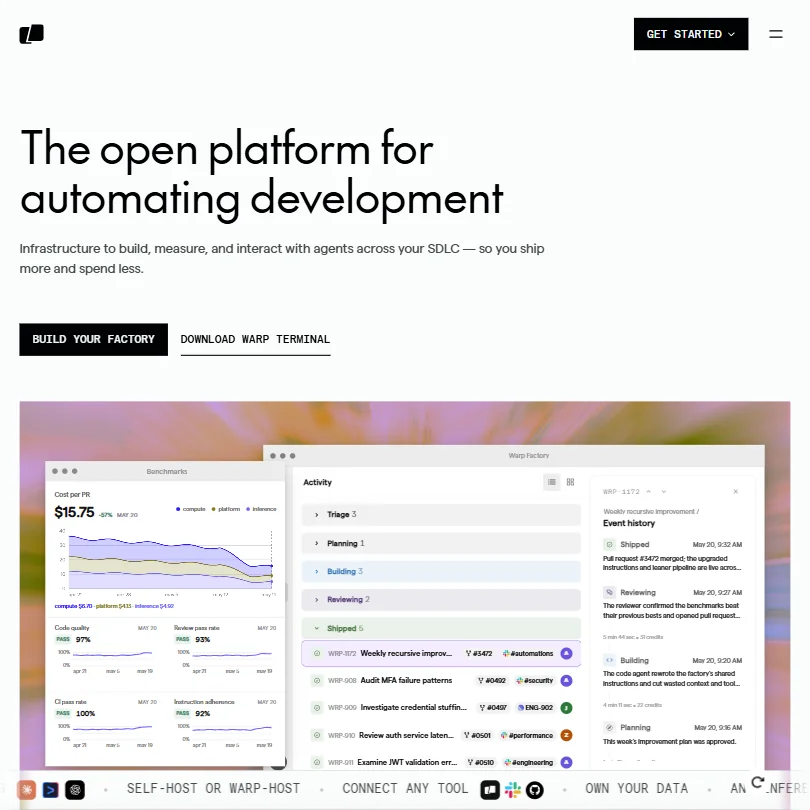
But the current product roadmap is somewhere else entirely. Warp Factories is the centerpiece now, a cloud orchestration layer that runs fleets of coding agents across an entire development cycle. Not autocomplete. Agents that investigate CI failures, audit auth logs, review pull requests, track deploy regressions. Routed through Warp's own infrastructure.
It's a significant pivot for something that used to be "a better iTerm2." Whether the terminal and the agentic platform feel like one coherent product or just two things sharing a brand is worth checking in a trial.
Warp Features: Code Generation, Review & Developer Workflow
The terminal side covers the expected ground. AI-assisted command completion, natural language to shell command translation, and Warp Drive, a shared space for saving and distributing commands across a team. The Agent CLI is pipeable and scriptable, which means it works outside the terminal app itself.
The agentic layer is the harder part to judge. Warp Agent CLI connects to GitHub and spins up agents to handle work across a codebase. The product demo shows a Kanban-style board with tasks like "Diagnose session timeout anomalies." Agents pick those up, run them, and report back. Test whether that works the way the demo implies.
The Factory dashboard surfaces cost-per-PR metrics alongside code quality and CI pass rates, which is a smarter framing than most competitors bother with. Showing actual per-artifact costs is the kind of transparency teams will care about, assuming the numbers hold up in practice.
Codebase indexing goes up to 100,000 files per codebase. The number of codebases you can connect varies by plan. The model layer is multi-provider, covering OpenAI, Anthropic, and open-source options, plus bring-your-own. Integrations include GitHub, Slack, Linear, and MCP support. A few others exist, but those are the ones that matter for the Factory workflow.
Warp Code Quality: How Accurate and Reliable Is It?
No G2 or Capterra presence means we're working without the usual review corpus. Real gap. The terminal itself is the more established, better-documented part of the product. People liked the input editing, the command block structure, and the AI suggestions for shell work. Complaints clustered around occasional slowness or heavy resource usage on particular machines. Not universal, but consistent enough to note.
Not great on the agentic side. Almost nothing to go on from user reports. Warp Factories appears to be a relatively recent launch, and the claims around agent-driven code review and regression tracking are plausible given what comparable tools do, but we're running on vendor documentation until more independent data surfaces.
We're not dismissing the quality claims. We just can't confirm them, and we won't pretend otherwise.
Warp IDE & Workflow Integration: Where Does It Work?
No VS Code extension. No JetBrains plugin. Warp is a standalone terminal, and that's a real ceiling for how it slots into existing developer workflows.
Terminal-native developers won't feel it. Developers who split time between an IDE and the command line, which is most of them, are managing two separate tools with no bridge. That's a deliberate product decision, not an oversight, but it's still a constraint.
Fair. The integrations that do exist carry real weight. GitHub automation, Slack, Linear, webhooks, and MCP support give the Factory workflow genuine connective tissue with a typical engineering stack. The Enterprise tier adds a custom Analytics API, though no self-hosting option was found for the platform itself. That's a meaningful jump for larger teams.
Warp's underlying bet is that the terminal becomes the control plane for agentic work, not the IDE. That bet might pay off. It might not. But Cursor is competing from the other direction, wrapping the whole editor experience, and developers will have to pick a center of gravity at some point.
Is Warp Easy to Set Up and Use?
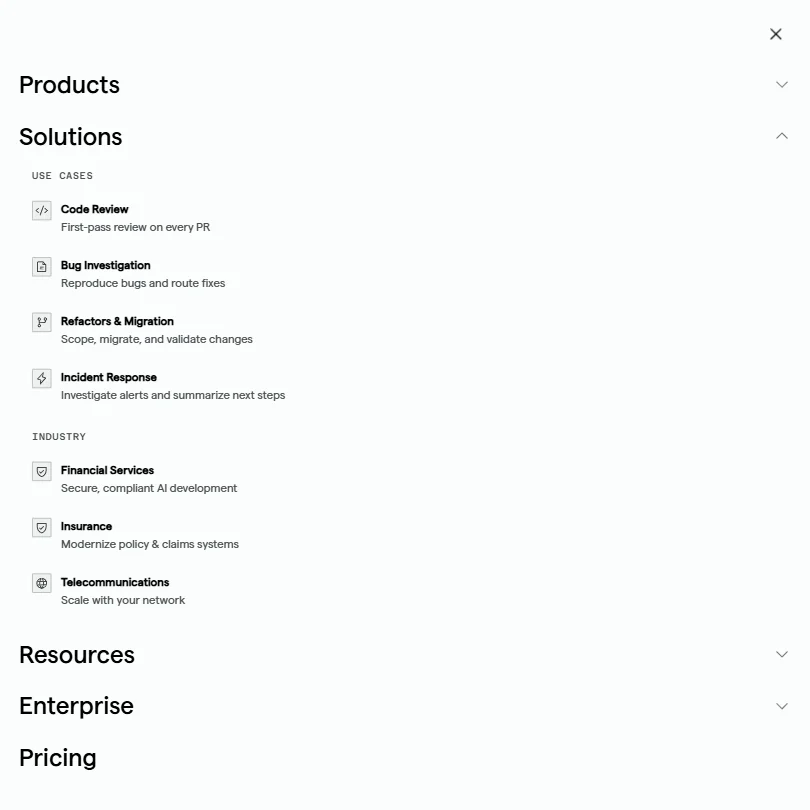
Available on Mac, Linux, Windows, and web. That's broader platform coverage than most terminal tools bother with. The Free plan gives you the core terminal, limited cloud agents, limited Warp Drive access, and limited cloud conversation storage. No time-boxed trial. Just download and use it.
Documentation is thorough. The help center reads like someone actually maintains it, which isn't a given. There's a Slack community, which is the right call for a developer-focused product trying to build trust without a G2 profile to lean on.
Getting Factories running takes real effort. Connecting codebases, configuring agents, setting up GitHub automation. Not a five-minute job. The homepage makes it look clean, but real onboarding likely has more friction than that, so talk to teams who've done it first.
Warp Pricing: Is It Worth It for Solo Devs and Teams?
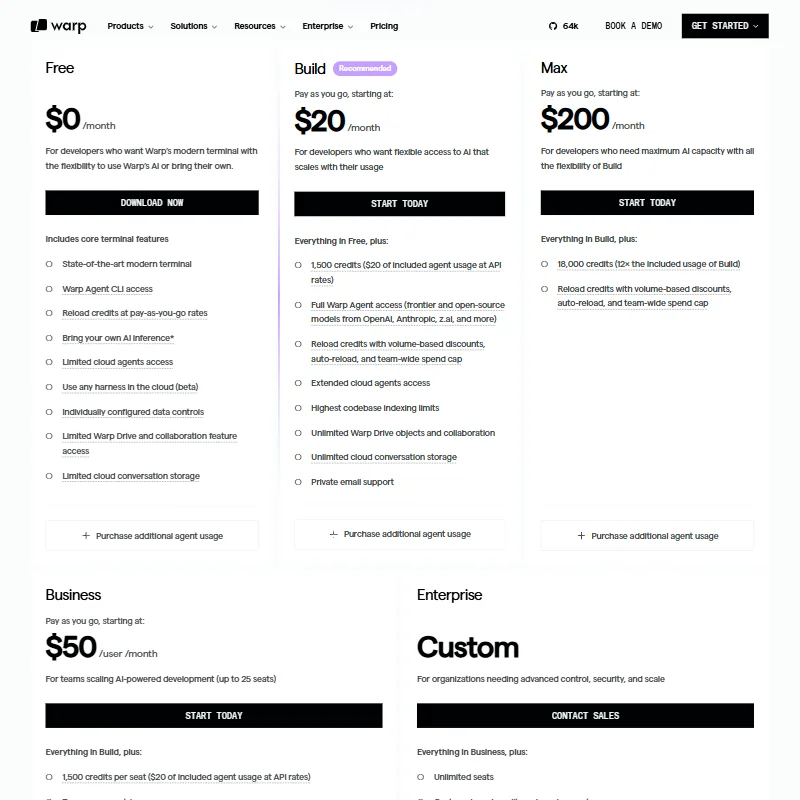
The Free tier is a genuine free tier. Core terminal features, some cloud agent runs, limited storage, and pay-as-you-go credit reloads. That last part matters because it means you can test agentic features without committing to a monthly plan, which is a reasonable structure for solo developers poking at the edges.
Build starts at $20 per month, sits around the category median based on what we track, and includes 1,500 credits ($20 of included agent usage at API rates). Max runs $200 per month, giving 18,000 credits, and adds volume-based discounts, auto-reload, and team-wide spend caps. Business is $50 per user per month for up to 25 seats. Enterprise is custom.
That jump from $20 to $50 per seat is steep, and it needs a sharper breakdown of what concretely justifies it beyond the feature comparison on the pricing page. The cost-per-PR dashboard is clearly designed to help teams answer that question themselves. Smart move.
On refunds: Warp's public Plans, Pricing and Refunds page documents that monthly plan subscribers can request a refund within 72 hours of an accidental subscription if they downgrade, subject to AI credit use conditions. Annual plans have a 30-day window. Add-on credit refunds are handled separately. Overage credits are non-refundable. That's a reasonable policy, and the fact that they've published it clearly is worth acknowledging.
Warp vs GitHub Copilot: Which AI Coding Tool Is Better?
Almost different categories. GitHub Copilot lives inside your editor and handles code completion line by line, file by file. That's where most developers spend most of their time, and Copilot has a large installed base because of it.
Warp doesn't try to compete there. The terminal completions handle shell work, but the actual ambition is the orchestration layer above the code. Running agents across a full codebase, investigating CI flakiness, tracking regressions. That's a workflow layer, not a pair programming tool.
The audience that needs better autocomplete inside an IDE won't find it here. The audience that wants automated agent work running across a development pipeline is one of the few places Warp is genuinely building toward something differentiated.
We cross-referenced what developers actually complained about in both communities. Copilot criticism tends to center on suggestion quality and context limits. Warp criticism tends to center on resource usage and the lack of IDE integration. Different friction points, different use cases. The honest answer is that plenty of developers will end up running both.
Who Should Use Warp? (And Who Shouldn't)
Terminal-native developers who want AI-assisted shell work with shareable command libraries built in. Obvious fit.
Engineering teams running complex CI pipelines who want agent automation sitting on top of GitHub. That's the emerging use case, and it's where Warp is placing its bets with the Factories product.
Developers who live entirely inside VS Code or a JetBrains IDE and rarely open a terminal directly. Warp isn't built for that workflow, and nothing in the current product roadmap suggests that's changing.
Teams that care about per-run cost visibility on agent work will find the benchmark dashboards useful in a way most competing platforms don't offer. That's a real differentiator, not a marketing claim, assuming the data holds up in production environments.
Warp Review Verdict
Warp built a genuinely good terminal and then made a bet that the terminal is where agentic development belongs long-term. That bet isn't obviously wrong. It's actually one of the more coherent product visions in a space full of AI wrappers with no clear identity.
The terminal features are solid. The agentic layer is ambitious. The lack of any major review platform presence means the usual signal on real-world team performance is missing, and we're not comfortable filling that gap with speculation.
The Free tier and the $20 Build plan are reasonable entry points for individual developers who want to test the direction without committing, especially given the pay-as-you-go credit structure. At $50 per seat, you'd want to run the Factory features hard before signing a team up.
The missing IDE integration is a real constraint. It won't matter to everyone. It will matter to enough developers that Warp should own that tradeoff more directly than their current marketing does. Not a dealbreaker. Just a wall some teams will eventually hit.
How Warp compares
Warp scores 7.4 out of 10 among the AI coding assistants we rate. These two do the same job and are the closest to it, compared on what each vendor publishes.
Zed
Warp trains on your code by default with no opt-out found on its site, while Zed states your code is never used to train AI models. Zed's Pro plan costs $10 a month, half of Warp's Build plan at $20 a month. Warp reviews pull requests before you commit; Zed's agent only reviews its own proposed edits, not external pull requests.
Pick Zed if you want a tool that never trains on your code.
Pick Warp if you want pull request review built into a terminal agent.
Cursor
Warp and Cursor both charge $20 a month for their entry paid plans. Cursor lets you turn on Privacy Mode to stop training and keep no copy of your code; Warp trains on your code by default with no opt-out found on its site. Warp offers legal cover for generated code on its Enterprise plan, something Cursor does not offer.
Pick Cursor if you want an opt-out privacy mode for training.
Pick Warp if you want legal cover for generated code on enterprise.
Frequently Asked Questions
Is Warp free to use?
Yes, and it's a genuine free tier, not a hobbled trial. It includes the core terminal features, limited cloud agent runs, limited Warp Drive access, and limited cloud conversation storage. Credits can be added on a pay-as-you-go basis if you want more agent capacity. Most individual developers will find the Free plan sufficient for getting started.
Does Warp work inside VS Code or JetBrains?
No. Warp is a standalone terminal application. There's no IDE plugin, no VS Code extension, nothing embedded in an editor. It runs alongside your IDE, not inside it. Developers whose workflow is primarily IDE-based will feel that absence quickly.
What's the difference between the Warp terminal and Warp Factories?
The terminal is the base product, covering AI-assisted command completion, Warp Drive command libraries, and a cleaner shell experience than most alternatives. Warp Factories is the newer layer built on top: cloud-hosted agent infrastructure that automates tasks across a codebase, connecting to GitHub, CI systems, and project tools like Linear. They share a platform. They serve fairly different workflows, and it's worth knowing which one you're actually buying.