
We pulled vendor docs and worked through what Greptile says about itself. For a tool that launched in 2023, it's moved fast. The pitch around greptile ai code review is specific enough to be interesting: not a general coding assistant, not autocomplete, but a focused system for reviewing pull requests with something closer to full-project awareness. Whether that holds up in practice is the real question.

What is Greptile?
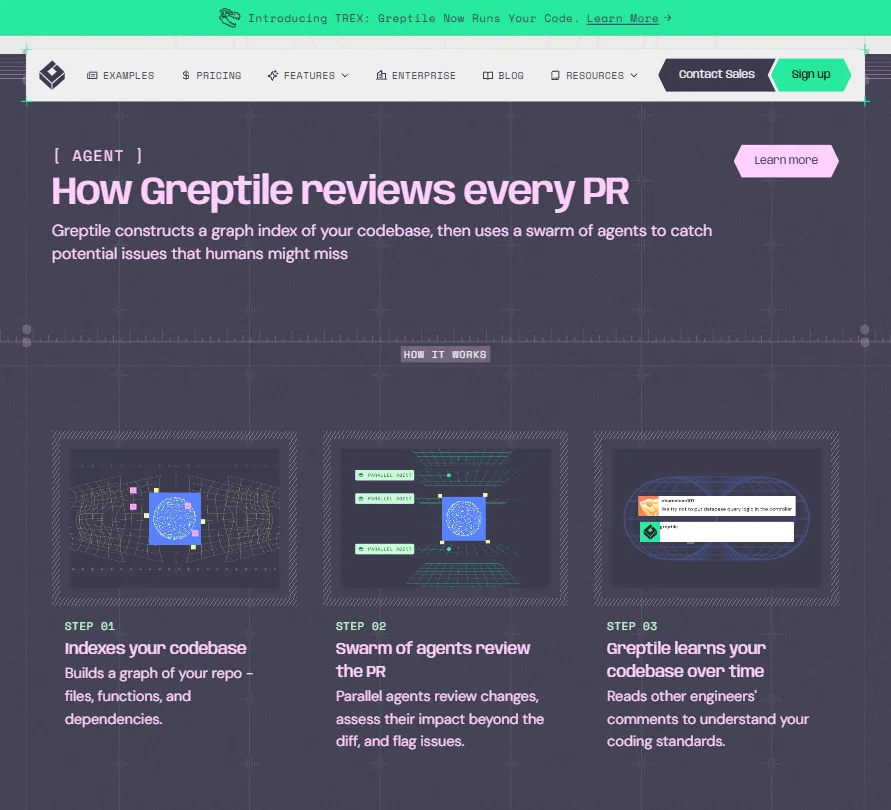
Greptile is a San Francisco company, founded in 2023, that builds AI-powered code review into your pull request workflow. It connects to GitHub or GitLab, indexes your codebase into a graph structure covering files, functions, and dependencies, then sends a swarm of parallel agents at every PR you open.
The idea is that most automated code review tools only see the diff. Greptile claims to see the whole codebase. So when a change in one file breaks an assumption in a file three layers removed, it's supposed to catch that. That's the core claim.
As of early 2026, they're serving over 9,000 teams. The v4 release focused on cutting false positives, which tells you the earlier versions had a noise problem. Honest progress, at least.
Greptile Features: Code Generation, Review & Developer Workflow
Greptile doesn't do code completion. It doesn't generate new code for you. That's important to state clearly, because the category gets blurry fast.
What it does is automated pull request review with codebase-level context. Every PR gets inline comments, click-to-apply suggestions, and a natural language summary of what changed and why it matters. The summaries can include Mermaid diagrams of the affected logic. Nice touch.
The TREX agent is newer. It writes and runs tests for each PR inside a sandbox environment. The test generation angle is worth watching, though it's too early to know how reliable it is in production. Wait for more user data before relying on it.
On the refactoring side, Greptile surfaces suggestions when code patterns drift from your team's established standards. You can write those standards in plain English. No custom rule DSL to learn, no configuration syntax to memorize.
Security scanning is in there too. Not a dedicated SAST tool, but it flags overflow vulnerabilities and undefined method calls as part of the review pass. That breadth is either a strength or a jack-of-all-trades problem depending on what you need. Worth deciding before you commit.
The IDE integration works differently than you'd expect. It doesn't sit inside the editor doing completions. Instead, it lets you push issue context from a review to Cursor or Claude Code in one click. A workflow bridge, not a deep IDE plugin. Understand that distinction before you sign up.
Greptile Code Quality: How Accurate and Reliable Is It?
Feedback is mixed here. The v4 release in early 2026 specifically addressed false positives, a real pain point for users. That tracks.
What we kept seeing before v4 was a familiar complaint: too many comments on things that don't matter, not enough signal on things that do. Signal-to-noise ratio was the main frustration in pre-v4 threads, and some teams said they just stopped reading the comments after a while. That's the failure mode for any automated reviewer. Not great.
Post-v4, the picture looks better. Multi-file logic detection stands out as a specific strength. Catching a bug that crosses three files is genuinely hard, and a few developers described catching real issues they would have missed in human review. We're not chasing the marketing angle here, but those are concrete results.
The codebase graph indexing is the architectural reason this might actually work. Simpler tools read the diff. Greptile reads the diff in the context of what it knows about everything the diff touches. Whether that edge holds up across huge monorepos is worth testing on your own code.
Greptile IDE & Workflow Integration: Where Does It Work?
GitHub and GitLab are the main entry points. That covers most teams.
MCP integration is there for teams running coding agents. Zapier shows up for workflow automation. The integrations list isn't trying to be everything. It's focused on the PR review loop and the agent handoff, and that focus is probably intentional.
The one-click push to Claude Code or Codex is the most interesting integration, honestly. Greptile identifies the problem, another tool handles the fix. That division of labor makes sense for teams already running agentic workflows.
What's missing: there's no clear answer in the docs on VS Code extension or JetBrains plugin status. Teams wanting native editor presence might look at CodeRabbit, which sits more directly in the PR interface without the same IDE ambiguity. Worth factoring in.
Is Greptile Easy to Set Up and Use?
Setup connects through GitHub or GitLab, and Greptile indexes your repos automatically. No configuration file to write. The plain English custom rules are probably the most accessible part of the onboarding process for teams that have standards they want enforced consistently.
The learning curve comes later. Getting real value out of the tool means understanding what the agents can and can't see, tuning noise thresholds, and figuring out which comment types your team actually wants to act on. That part isn't documented as well as it could be. Fair.
A recurring friction point is worth flagging: teams expecting a general AI coding assistant can be surprised by the narrow focus. It's a PR reviewer. Not a pair programmer. Setting that expectation early saves real frustration.
Greptile Pricing: Is It Worth It for Solo Devs and Teams?
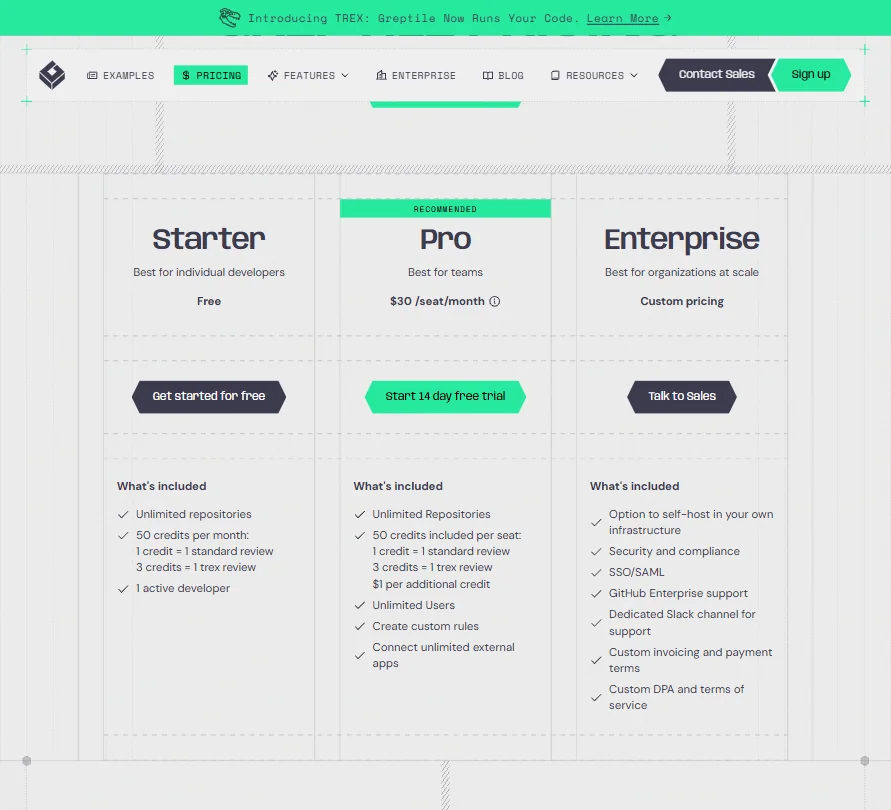
Three tiers. The Starter plan is free, includes 50 credits per month, and supports one active developer. The Pro plan is $30 per seat per month. It includes 50 credits per seat too, with additional credits available at $1 each, and adds unlimited users alongside the ability to create custom rules and connect unlimited external apps. Worth reading the fine print on what "unlimited users" means alongside per-seat pricing.
Enterprise is custom pricing, requires a conversation with sales, and adds self-hosted deployment in your own infrastructure. SSO and SAML land here too, as do a dedicated Slack channel for support and a custom DPA.
On refunds: the public terms are generally non-refundable and non-cancellable, except where the agreement expressly provides otherwise. A proportional refund can apply if Greptile fails to cure a material breach of its limited warranty. The self-hosted documentation describes a 100% refund in the first 30 days and prorated refunds during months two through four for certain upfront payments. That distinction between cloud and self-hosted refund terms isn't surfaced anywhere obvious during the buying process. Not a dealbreaker, but it signals that the commercial terms still need some polish.
$30 per seat is competitive against the rest of the AI code review market, where prices cluster in the same range. The question isn't whether it's cheap. It's whether the accuracy improvement over cheaper or free options justifies the line item. For small teams on tight budgets, that's a real calculation.
Greptile vs CodeRabbit: Which AI Coding Tool Is Better?
Both plug into GitHub and GitLab. Both review PRs automatically. Both leave inline comments.
The architectural difference is real. CodeRabbit is diff-focused and well-regarded for that. Greptile's graph indexing is the bet that cross-file context changes the quality of the review. For simple projects or small repos, you probably won't feel the difference. For large codebases with complex interdependencies, Greptile's approach has a genuine argument to make.
CodeRabbit has a longer track record and more publicly available user reviews. Greptile is newer and the review volume is thinner, which makes firm conclusions harder to draw. We're not making a definitive call. The architectural argument favors Greptile for complex codebases. Everything else is roughly comparable.
Who Should Use Greptile? (And Who Shouldn't)
Engineering teams running large, interconnected codebases. That's the fit. The cross-file bug detection is where Greptile earns its price.
Teams that want autocomplete or inline code generation. Not what this is. Greptile won't write code for you. It reviews code you've already written, and that distinction matters a lot.
Solo developers on simple projects probably don't need the graph indexing overhead. The free Starter tier exists, so cost isn't the barrier. It's more about whether the complexity of the tool matches the complexity of your work. Often it won't.
Teams with strict data residency requirements will care about the self-hosted Enterprise option. That's a real offering, not vaporware, and it's one of the more compelling differentiators in the category.
Greptile Review Verdict
Greptile is doing something technically specific and doing it reasonably well. The codebase graph indexing is a real architectural choice, not a marketing claim, and the v4 improvements on false positives show a team that's paying attention to feedback.
The gaps are real too. Support options are thin across all non-Enterprise plans. No live chat, no community forum, email only on Starter and Pro. At $30 per seat, that feels under-built compared to what competitors offer at similar price points. The refund policy complexity is a small thing that probably shouldn't be a small thing.
The TREX test generation agent is promising but new enough that it needs more months of user data before you lean on it in production. The IDE integration story is narrower than competitors in some respects.
What we're left with is a focused tool that does one thing at a level above most of the alternatives. It's not for everyone. It doesn't try to be. For teams tired of code review that only catches what's visible in the diff, the 14-day Pro trial is a reasonable place to start.
Frequently Asked Questions
Does Greptile work with both GitHub and GitLab?
Yes. Both are supported natively. Greptile connects to your repos, indexes them, and starts reviewing PRs automatically on either platform. The setup process is the same for both.
Is Greptile safe to use with a private codebase?
Greptile offers self-hosted deployment in your own infrastructure at the Enterprise tier, which keeps everything inside your environment. For teams on the cloud plans, the vendor docs describe standard security practices, but we'd recommend reading those directly if you have specific compliance requirements. Don't take our word for it on that one.
How does Greptile compare to just using GitHub Copilot for code review?
Copilot is primarily a code generation and completion tool. Code review is not its core function. Greptile is built specifically for PR review with codebase-level context, designed to catch problems across files rather than help you write new code faster. Different jobs entirely.







