
Amazon Q is a tool that's genuinely impressive in a narrow lane and genuinely confusing everywhere else. This is our amazon q review, and the confusion starts right at the name.
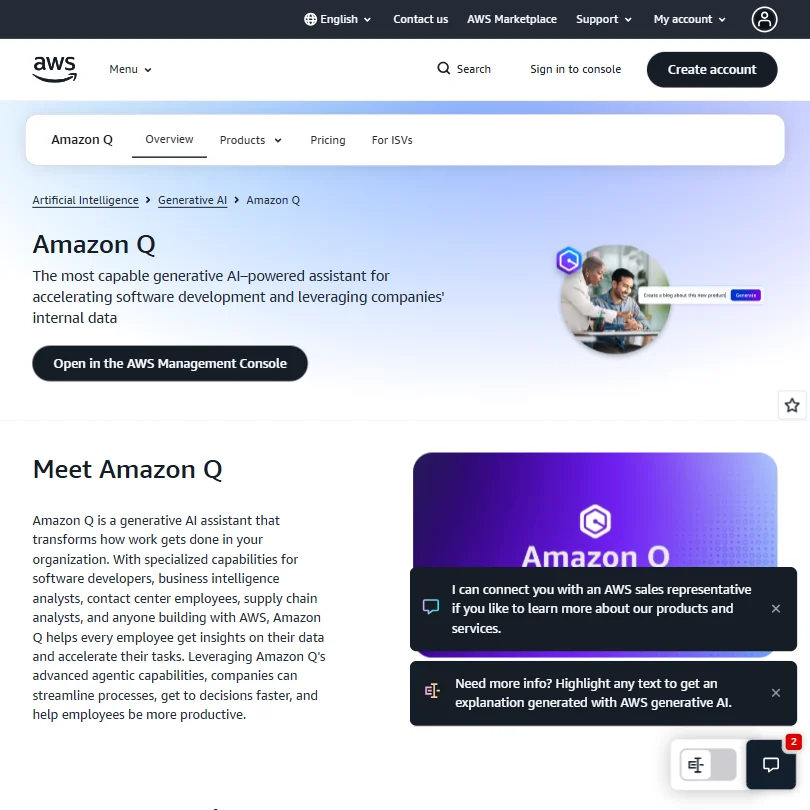
Amazon Q isn't one product. It's a family of them. That matters for anyone trying to figure out what they're actually buying.
What is AWS?
Amazon launched Q in late 2023. It's a generative AI assistant built by Amazon, delivered across AWS infrastructure, and it comes in several flavors depending on what you need it to do.
Amazon Q Developer is the coding-focused product. It plugs into VS Code and JetBrains IDEs, runs in the CLI, and shows up in the AWS Management Console. It suggests code, scans for security issues, and can help modernize older applications. Amazon Q Business is the enterprise knowledge-base product. You connect it to your company's data sources and it answers employee questions, pulls from internal documents, and acts as a kind of internal search layer with AI on top. Then there's Amazon Q in QuickSight for BI, and a version for Amazon Connect contact centers.
The pitch varies wildly depending on which product page you're reading. That's not accidental. AWS is positioning Q as a platform, not a point tool. Whether that's a strength or a navigation nightmare depends on what you came for.
Honestly, the Developer product is the one most people searching for an aws ai coding assistant actually want. We'll focus there, with notes on Business where the pricing or use case diverges.
AWS Features: Code Generation, Review & Developer Workflow
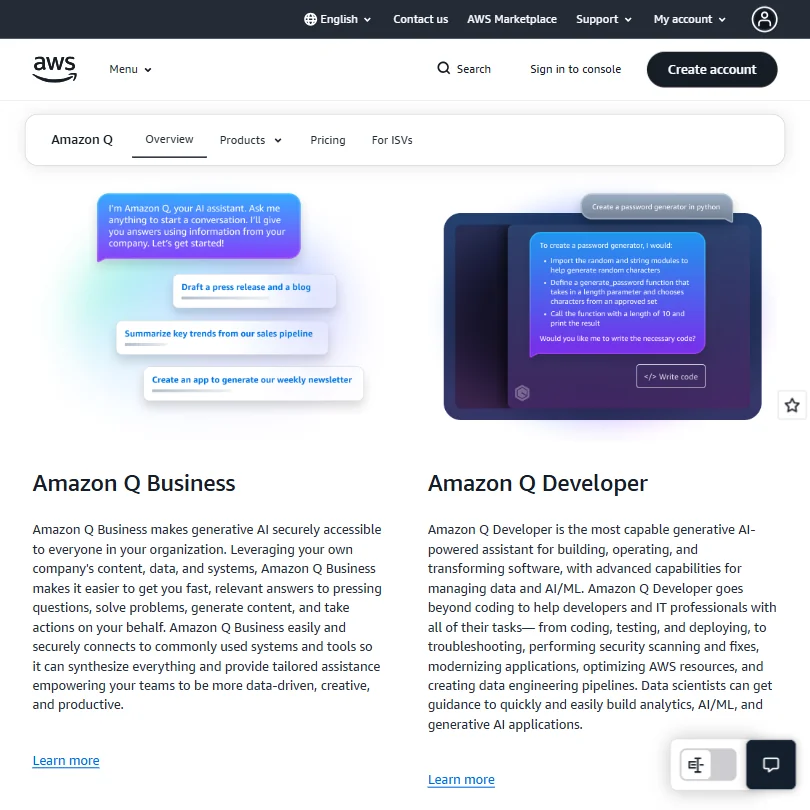
The feature list for Amazon Q Developer is long. Longer than most competitors.
Code suggestions show up inline in the IDE, with multi-line support. Amazon has claimed the highest acceptance rates in the industry for these suggestions, and it's a claim they repeat often enough that it's worth scrutinizing. We'll come back to it. Beyond suggestions, Q Developer handles code generation from natural language and writes tests. Debugging is there too, with security scans and automated fix suggestions baked into the same workflow rather than bolted on afterward.
The refactoring and modernization capabilities are where Q Developer separates itself a bit. It can take older Java applications and help port them, and it can scan a legacy codebase and suggest a path forward. Most competing tools don't touch that. GitHub Copilot does a lot of the same day-to-day coding assistance, but modernization is not its lane.
On the business side, the connector list is extensive. It hooks into Salesforce, Slack, and a few others, with over 50 connectors according to the docs. For enterprise teams trying to build a unified internal assistant, the breadth there is meaningful.
Codebase indexing is available on the Pro tier, which lets Q customize suggestions based on your own repositories. That's the feature that pushes most teams off the free tier. Worth knowing upfront.
Test generation and debugging are present, but community forums describe them as serviceable rather than standout. Most users seem to reach for Q on suggestions and the occasional code generation task. The testing features don't come up often in reviews.
Fair. Not every feature gets used. True of every platform tool.
AWS Code Quality: How Accurate and Reliable Is It?
Amazon claims Q Developer has the highest reported acceptance rates for inline suggestions. They published internal data to back that up. Treat that claim with caution, not because it's obviously false, but because acceptance rate is a slippery metric. Accepting a suggestion doesn't mean it was good. It means it was fast and close enough.
What the forums do say, consistently, is that Q Developer handles AWS-specific code well. Better than alternatives. If you're writing Lambda functions, building on DynamoDB, or working within the CloudFormation ecosystem, the suggestions are noticeably more relevant than what GitHub Copilot or Cursor tends to produce. That tracks. Amazon trained these models on their own ecosystem and it shows.
Outside of AWS-specific work, the quality picture gets hazier. One pattern we kept seeing in developer communities was people running Q alongside another tool, using Q specifically for the AWS calls and letting something else handle the rest.
The security scanning feature came up positively more often than we expected. Several developers mentioned it catching real issues, not just lint-style warnings. That matters, and it's something most of the competition doesn't match at this depth.
AWS IDE & Workflow Integration: Where Does It Work?
VS Code and JetBrains are covered. The CLI is covered in the free tier, which is a real differentiator. Most tools treat CLI support as an afterthought or a paid feature. Amazon ships it for free, and developers who live in the terminal seem to appreciate that.
The AWS Management Console integration is unique. No other coding assistant lives inside the cloud console itself. For teams doing infrastructure work, that's genuinely useful. Not flashy. Useful.
Git integration exists. GitHub and GitLab connections are supported for codebase indexing. The docs are detailed on how this works, which is more than can be said for some competitors who describe it vaguely and hope you don't ask follow-up questions.
What's missing is a standalone editor. Cursor has built its whole product around an AI-native editor experience. Amazon Q Developer is an IDE plugin, which means it depends on you already being set up in VS Code or a JetBrains product. For a lot of developers that's fine. For teams evaluating a wholesale workflow change, Q Developer won't give you a new editor to work in.
No self-hosted option. Everything runs through AWS infrastructure. For most enterprise teams that's expected. For the privacy-sensitive crowd, it's a non-starter. Tabnine has a self-hosted path if that's what you need.
Is AWS Easy to Set Up and Use?
This is where AWS's size works against it.
Setting up the IDE plugin itself is straightforward. Download, authenticate with your AWS account, and you're in. The free tier requires an AWS Builder ID or an AWS account, neither of which is complicated to get, but it's one more account compared to competitors that use GitHub login.
The harder part is figuring out which product you actually need. We spent longer than we should have on the Amazon Q product page trying to map feature sets to pricing tiers. The overlap between Q Developer and Q Business is never clearly explained. AWS docs are thorough, but they're written for people who already understand AWS. That's a lot to assume.
For teams already deep in the AWS ecosystem, onboarding is probably smooth. Developers coming from outside AWS who just want a good coding assistant face real cognitive overhead before the first suggestion ever appears.
The re:Post community forum is active and the Knowledge Center is detailed. Support otherwise goes through AWS Support plans, which adds cost. No real-time chat with a human. Standard for AWS, but it stands out against competitors that include chat support at lower tiers.
AWS Pricing: Is It Worth It for Solo Devs and Teams?
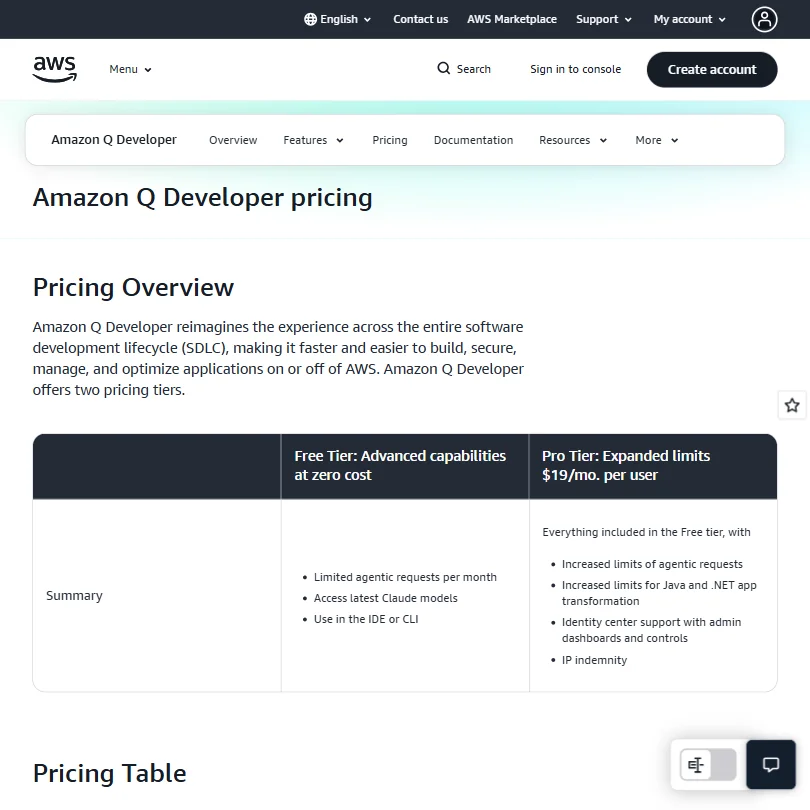
The free tier for Amazon Q Developer is genuinely usable. Inline code suggestions, CLI completions, and limited agentic requests come at no cost, along with access to the latest Claude models. That's more than most free tiers deliver. Among the 30 AI developer tools we've tracked, the free tier here is above average in terms of what you actually get.
From there: $3 a month for Amazon Q Business Lite, $19 a month for Q Developer Pro. That Pro tier is where expanded limits on agentic requests unlock, along with increased limits for Java and .NET app transformation. Identity center support with admin dashboards comes at that tier too, as does IP indemnity, which matters more than people expect until it suddenly matters a lot.
$19 a month is competitive. GitHub Copilot runs $10 for individuals and $19 for business. So Q Developer Pro lands in the same range as Copilot Business. Fair fight on price.
Where pricing gets opaque is the cross-product story. If your team wants Q Developer and Q Business and QuickSight capabilities, you're stacking costs across separate products. AWS doesn't make that math easy to do from the pricing page. We dug through it and still weren't completely clear on what a fully-loaded enterprise deployment runs.
No publicly stated refund policy. Not unusual for AWS, but worth flagging. At $3 or $19 per user per month, there's real value here. The free tier alone might be enough for solo developers doing most of their work on AWS.
AWS vs GitHub Copilot: Which AI Coding Tool Is Better?
This is the comparison that matters for most people reading this.
GitHub Copilot has the bigger install base and broader community. It works across more editors, it's lighter on setup, and for general-purpose coding in Python or JavaScript it's the default choice for a reason.
Amazon Q Developer is the better tool the moment your codebase touches AWS. Lambda, CloudFormation, IAM, CDK. Doesn't matter. Q knows that terrain better, and the difference is noticeable. Add the security scanning and the modernization capabilities, and Q Developer is doing things Copilot doesn't touch.
Copilot has better third-party coverage, more YouTube tutorials, and a longer history of community-produced tips and fixes. Q Developer launched in late 2023 and Amazon Q Developer has a modest but established G2 review trail, with 34 published reviews. That's not a fatal flaw. It just means you're buying into a newer product with a thinner feedback trail.
For pure AWS shops, Q Developer is the logical choice. For teams with mixed infrastructure or no AWS dependency, Copilot is probably still the right default.
Who Should Use AWS? (And Who Shouldn't)
AWS-first engineering teams. That's the fit. If your infrastructure lives in AWS and your developers spend meaningful time on resource configuration, Lambda code, or anything CloudFormation-adjacent, Q Developer will return its cost quickly.
Enterprise teams building internal knowledge tools. Q Business has the connector depth to be genuinely useful as an internal assistant, but only if your organization is already comfortable managing data access and permissions at scale. The permission-aware response system is real and it's a meaningful security feature, but it requires proper identity and access configuration to work correctly.
Solo developers who mostly work outside AWS. Not the right fit. Not because Q is bad, but because you'd be paying for AWS depth you won't use. GitHub Copilot at $10 a month is probably the better call.
Teams with strict data residency requirements are the other clear no. No self-hosted option means everything goes through AWS's cloud. That's a dealbreaker in some regulated industries regardless of how good the security controls are.
AWS Review Verdict
Amazon Q Developer is a capable coding assistant that earns its place in a specific context. That context is AWS.
Outside of that context, the case gets softer. The general-purpose coding assistance is fine, not outstanding. The product complexity is real. The setup friction is real. The pricing, once you move past the free tier, is fair but not cheap.
What it gets right is harder to dismiss. The security scanning is genuinely good. The inline suggestions for AWS-specific code outperform the competition. The free tier is more useful than most. And the modernization features for legacy applications are something almost no other coding assistant offers at any price.
The biggest problem is the product itself being hard to understand. Multiple Q products with different pricing and overlapping feature sets make it easy to buy the wrong thing, or to assume you're getting something you're not. AWS has never been known for making things simple to navigate, and Q doesn't break that pattern.
We'd take this seriously for any team building primarily on AWS infrastructure. For everyone else, there are sharper options for less overhead.
Frequently Asked Questions
Is Amazon Q Developer free?
Yes, there's a free tier. It includes inline code suggestions in the IDE and CLI, access to the latest Claude models, and limited agentic requests per month. The free tier requires an AWS Builder ID or standard AWS account. It's one of the more substantive free offerings in this category. You hit real limits when you want codebase indexing or the more advanced features, which live behind the $19 per user per month Developer Pro plan.
Is Amazon Q the same as GitHub Copilot?
Not really. Both are AI coding assistants, but they're built for different situations. GitHub Copilot is more general-purpose and has a larger community. Amazon Q Developer is stronger inside the AWS ecosystem and adds security scanning and application modernization capabilities that Copilot doesn't match. Most teams we've seen written about use one or the other based on where their infrastructure lives, not just on feature comparisons.
Does Amazon Q work outside of AWS tools?
Yes, for Amazon Q Developer. It works in VS Code and JetBrains IDEs regardless of whether you're writing AWS-specific code. The CLI integration also works broadly. That said, the suggestions get noticeably better when your code is touching AWS services. Outside of that, it's a solid but not exceptional coding assistant competing against tools with longer track records in the general-purpose lane.







