What is WordAi?
WordAi is an AI-powered article rewriting tool. Not a content generator in the traditional sense. You feed it existing text, and it restructures that text into something new, using meaning-based rewriting rather than synonym swapping.

That distinction matters. The older generation of spinners just swapped words. WordAi claims to rebuild sentences from scratch, preserving intent while producing output that reads differently enough to clear Copyscape checks. The pitch is specifically aimed at content marketers, SEO professionals, and agencies trying to scale output without scaling headcount.
It also offers bulk rewriting and up to 1,000 variations per article. That's the volume angle. Honestly, that number raised an eyebrow for us. More on what that actually means below.
Founded in 2013 and based in Baltimore, WordAi has been around longer than most of the tools it now competes against. That's not a compliment or a criticism. It's just context.
WordAi Features: What You Actually Get

The core loop is simple. Paste or upload an article, pick a creativity level from conservative to adventurous, get a rewritten version. Download it, or export Spintax if you're building for an SEO campaign.
Beyond that baseline, there's bulk article rewriting with bulk download. You can also import from Article Forge directly, which is useful if you're already running that tool upstream. API access ships on all paid plans, which is the integration story here. No WordPress plugin, no Chrome extension, and Zapier support is worth asking about. The API is the hook for anyone building custom workflows.
The Code View editor handles HTML, which is a practical touch. You're not forced to strip formatting before pasting.
What's absent is notable. No brand voice controls. No templates. No image generation, and no built-in plagiarism checker, though the vendor says rewrites pass Copyscape. We can't verify that independently.
WordAi AI Output Quality: Is It Good Enough?
This is where reviews diverge. Users running WordAi for SEO-focused bulk content tend to be satisfied. Users expecting polished, editorial-quality prose are disappointed. The adventurous creativity setting can drift. Sentences come out awkward. Context gets dropped.
The output quality is adequate for scaled SEO rewriting. It's not adequate for anything that needs a human editor to leave it alone afterward.
The "passes AI detection" claim deserves caution as a selling point. That framing is doing a lot of work. WordAi's own FAQ quietly qualifies it: the expected pass rate should correspond to the rate at which a given detector correctly identifies actual human writing. Which means if a detector gets human content wrong 15% of the time, WordAi's rewrites might trip it 15% of the time too. Detection tools update constantly. What cleared last month might flag today. The vendor can't guarantee otherwise.
Not great, as caveats go.
Is WordAi Easy to Use?
Mostly fine. Web-only, so there's nothing to install. The interface is straightforward. Paste, choose settings, rewrite. The bulk upload workflow is more involved, but it's manageable for agency-scale workflows.
The help center exists. No community forum. Support is email only, with no live chat confirmed. For a tool targeting agencies processing high volumes, that support structure feels thin.
Fair. Simple tools don't always need complex support. But when something breaks at 3am on a deadline, email-only is a problem.
WordAi Pricing: Is It Worth the Cost?
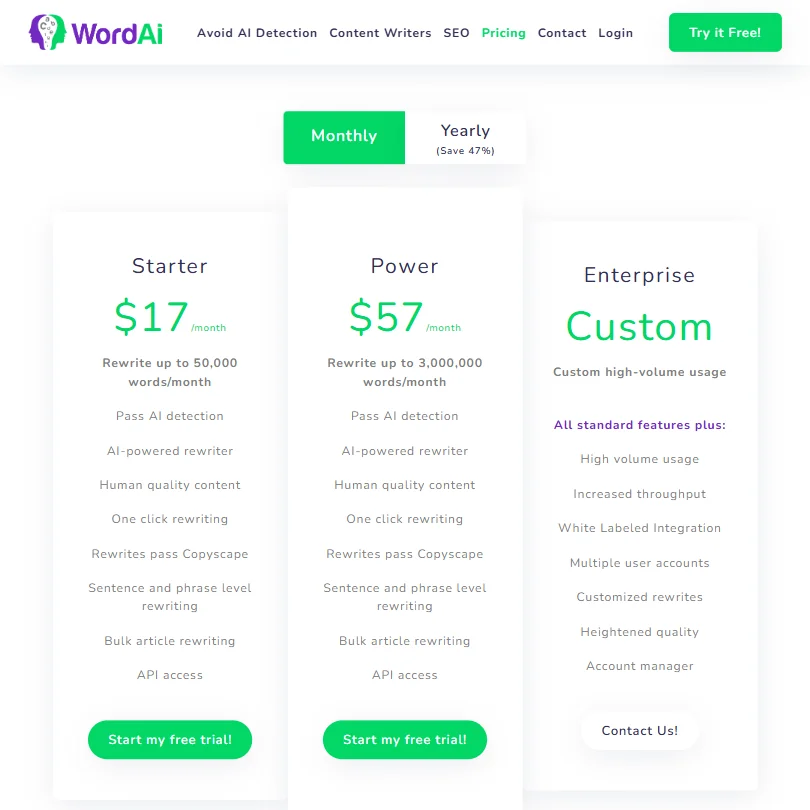
Three tiers. The Power plan is $57 per month on monthly billing, dropping to $27 per month on an annual commitment. Enterprise is custom, aimed at high-volume usage with white-label integration, multiple user accounts, and a dedicated account manager. There's a 3-day free trial and a 30-day money-back guarantee, though the guarantee only applies if you've rewritten fewer than 10 articles. Read that carefully before you subscribe.
Comparing WordAi to Quillbot on price takes some care. Quillbot Premium is around $8.33 per month, but that's the annually billed rate. Comparing that to WordAi's $57 monthly Power plan is an apples-to-oranges reading. On equivalent annual billing, the gap narrows, though it doesn't close. Power at $27 per month annually is a different ask, and whether that gap is worth it depends entirely on volume and workflow.
We don't buy the value story for solo users. Agencies running bulk SEO campaigns? Maybe.
WordAi vs Quillbot: Which Is Better?
Quillbot is the obvious comparison. It's cheaper, more widely used, and has a functional free plan. For casual paraphrasing, Quillbot wins on accessibility without argument.
WordAi is better at volume. Bulk processing, Spintax export, and API access give it a clear edge for anyone building production-scale content pipelines. Quillbot isn't built for that. It's a one-article-at-a-time tool.
The creativity controls in WordAi are also more granular. That matters for SEO work where you need meaningfully different versions, not just lightly reshuffled synonyms. We wouldn't call either tool a replacement for original writing. Both sit in the scale-and-repurpose bucket. WordAi just sits further along that axis. If original, long-form content creation is what you need, something like Koala AI is worth looking at instead.
Who Should Use WordAi? (And Who Shouldn't)
SEO agencies doing bulk content work. That's the actual fit here.
Solo bloggers looking to punch up their writing should skip it. The tool doesn't help you write better. It helps you produce more of the same thing, differently.
Content teams that need brand voice controls or template-based workflows will find WordAi frustrating. Nothing here supports that kind of structure. For those teams, Jasper AI is a more complete option.
WordAi Review Verdict
WordAi does one thing and mostly does it. Bulk rewriting at volume, with enough AI sophistication to stay above the synonym-swap tools it launched alongside in 2013.
The problems are real. Support is thin, the monthly-to-annual pricing gap is steep, and the quality ceiling is lower than the marketing suggests. The 3-day trial isn't enough time to evaluate bulk workflows meaningfully. Casual users will bounce.
If you're running an SEO operation that needs many article variations fast, WordAi is a reasonable tool. Not the most exciting one. Not the cheapest. But it works at what it's built for.
Frequently Asked Questions
Does WordAi pass AI detection tools?
The vendor claims rewrites are designed to read as human-written and to clear Copyscape checks. WordAi's own documentation qualifies this: the expected pass rate tracks with the rate at which a given detector correctly identifies real human content. So the guarantee is relative, not absolute. AI detection tools update frequently, and no rewriter can promise permanent clearance.
What's the WordAi refund policy?
There's a 30-day money-back guarantee, but it comes with a catch. It only applies if you've processed fewer than 10 articles during that period. That's a narrow window for anyone evaluating the tool seriously. Read the terms before you pay.
Is WordAi good for non-English content?
Officially, WordAi focuses on English. The vendor mentions some multilingual capability but doesn't confirm which languages or how well they perform. If you're working primarily in a language other than English, we wouldn't count on WordAi to handle it reliably.