
Locofy's premise is narrow by design. Take a Figma file, produce frontend code. Not a general AI assistant. Not an autocomplete layer. A converter, and nothing else. It delivers on that specific promise more often than not, but carries some friction the marketing glosses over.

Founded in Singapore in 2021, Locofy has stayed in its lane. The pitch hasn't changed much: designers hand off in Figma, developers need code, Locofy sits in between. Straightforward. The execution is where things get interesting.
What is Locofy.ai?
Not a Cursor competitor. Worth being clear about that upfront. Locofy isn't going after general agentic coding or inline autocomplete. It does one job, bridging the gap between a Figma or Penpot design and actual frontend code a developer can use.
The underlying engine is their proprietary Large Design Model, which Locofy calls an LDM. The argument is that a model trained specifically on design artifacts, millions of layouts and component patterns, understands spacing intent and component hierarchy better than a general-purpose language model fine-tuned on code. Honestly, that's a reasonable hypothesis. Whether it holds up consistently in production files is a different question, and one the thin review data doesn't fully settle.
The product lives primarily as a Figma plugin. Penpot support arrived more recently. There's a legacy Adobe XD plugin that still exists, a VS Code extension, and a CLI for importing design systems. That's the footprint.
Locofy.ai Features: Code Generation, Review & Developer Workflow
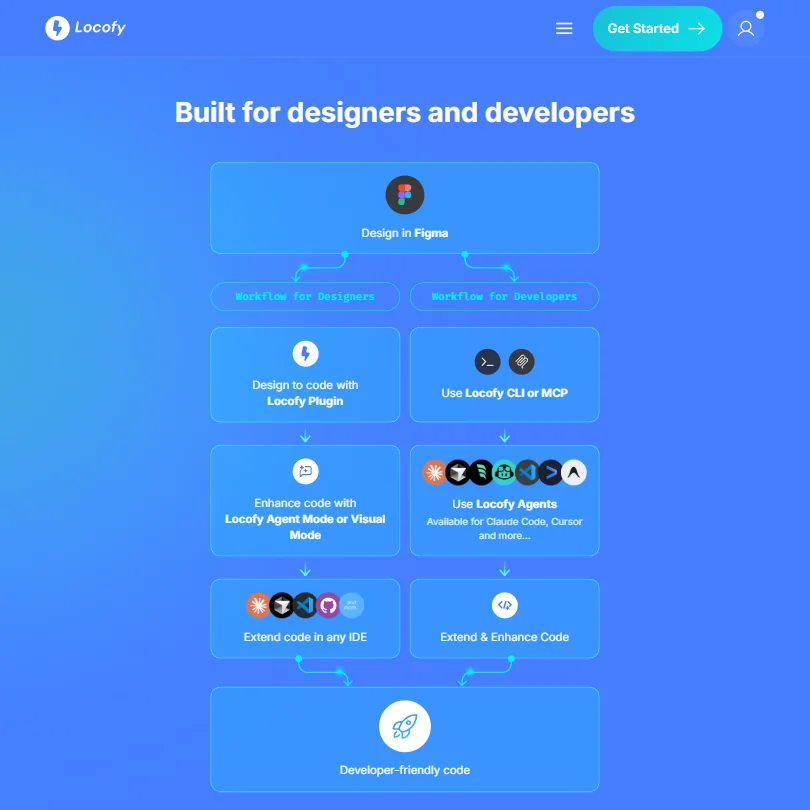
The core workflow isn't complicated. Connect your Figma file, tag components, generate output, pick a framework. That's it.
Framework coverage is one of Locofy's stronger arguments. React and React Native are the obvious targets, but Next.js, Angular, and Vue are all supported. Flutter, SwiftUI, and Jetpack Compose are on the list too. That range is genuinely wider than most competitors at this price point. Fair.
What Locofy doesn't do is equally important to name. No inline autocomplete. No test generation. No debugging. Expecting a full AI coding assistant here will disappoint you, and Locofy doesn't really pretend otherwise, which is at least honest.
The LocoAI refactoring feature identifies reusable components from your design and generates props automatically. On larger projects that saves a real chunk of time. The MCP integration is newer and actually the most interesting thing Locofy is building around right now. It connects into Cursor, Claude, and a couple of other AI coding agents so those tools can pull design tokens and component structures directly from the design file. That turns Locofy from a standalone converter into something closer to infrastructure. Smart move.
Auto-tagging tries to handle raw Figma files without requiring the designer to manually prepare the handoff. In practice, users report mixed results on messy or heavily customized files. Clean, structured files work better. That's not a knock on the feature, it's just the reality.
Locofy.ai Code Quality: How Accurate and Reliable Is It?
Locofy's G2 presence is essentially three five-star reviews. Three. That's a sample size problem, not a data set, and it makes firm conclusions from aggregate crowd data nearly impossible.
Reddit threads from 2024 and early 2025 fill in some of the gap. The general consensus is that the output is cleaner than what older tools like Anima produced, but the recurring complaint isn't broken code, it's that the output still needs meaningful cleanup before it's mergeable. Nested divs that don't reflect component intent. Inline styles leaking through when you expected clean CSS classes. Variable naming that mirrors Figma layer names, which are often "Frame 42" or worse.
That tracks. Designs are messy. No model fixes a chaotic Figma file without human input, and Locofy doesn't claim to.
SOC2 and ISO certifications are on the homepage. Enterprises care about that, and it matters for procurement conversations. Doesn't help with code quality directly, but it's there.
Locofy.ai IDE & Workflow Integration: Where Does It Work?
VS Code support works. JetBrains doesn't. That will annoy a real percentage of backend-leaning developers who also touch frontend work.
GitHub integration is locked to the Enterprise plan, which means custom pricing. Pushing generated code to a repo is a standard developer workflow. Gating it behind a quote-required tier when teams are already paying $80 a month for Pro is a choice. Not a great one.
The MCP integration story is genuinely the most compelling thing Locofy has right now. If your team already runs Cursor or Claude as part of daily workflow, Locofy's MCP server lets those agents pull design context directly. Component structures, layout data, design tokens, all accessible without manual export steps. That's a useful addition, and it's the angle that separates Locofy from tools like Fronty or DhiWise that aren't building around the agent workflow at all.
The CLI for design system import is practical. Not flashy.
Is Locofy.ai Easy to Set Up and Use?
Fast setup. Mostly. Install the Figma plugin, connect your account, tag components, generate. Maybe 20 minutes to first output on a clean file.
The friction appears when files aren't clean. Locofy's auto-tagging helps, but it's not a fix for a designer who's never thought about component structure. The "just drop in your design" pitch overstates things a bit. Not a lot, but enough to notice.
Documentation is basic. The help center covers the core flows and stops there. It doesn't go deep on edge cases or troubleshooting complex component hierarchies. Users on Reddit consistently describe email support as slow, so ask whether live chat is offered. For a $40-a-month tool, that's worth flagging.
Self-guided onboarding is listed as a feature on both the Hobby and Pro plans. Technically accurate. The phrasing is doing some work there.
Locofy.ai Pricing: Is It Worth It for Solo Devs and Teams?
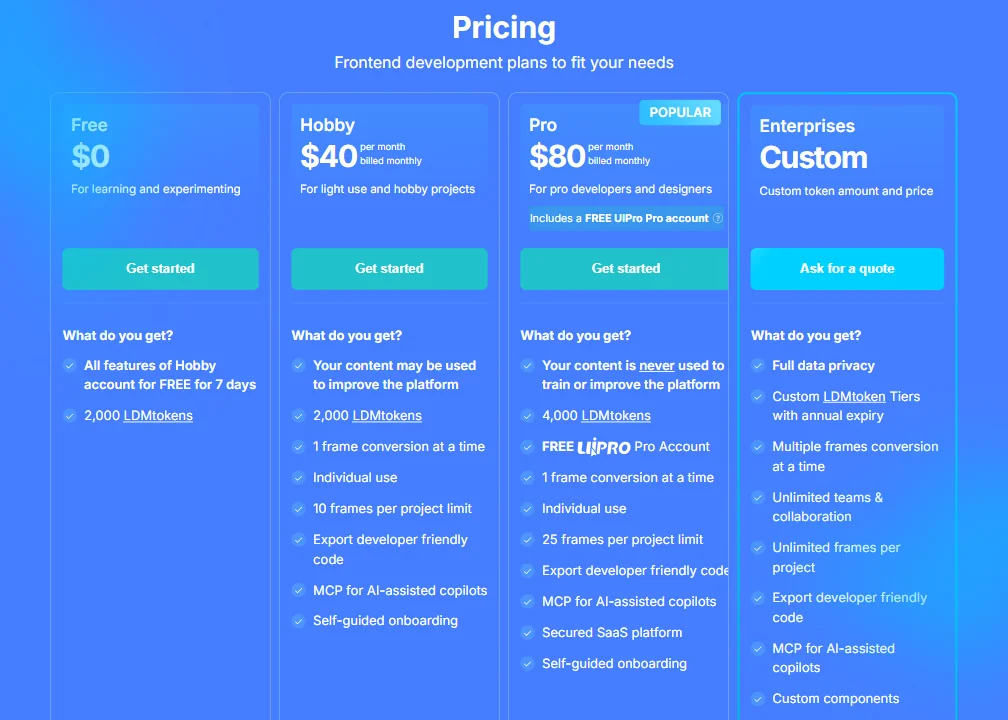
Four tiers total. Free trial for seven days with all Hobby features and 2,000 LDMtokens. Hobby at $40 per month, billed monthly. Pro at $80 per month, also billed monthly. Enterprise at custom pricing.
The Pro plan bumps the token allocation to 4,000 LDMtokens and raises the frame limit from 10 per project to 25. It also includes a free UIPro Pro account, content privacy (your designs are never used to train the model), and access to the secured SaaS platform. The Hobby plan doesn't offer that content privacy guarantee. Worth knowing before you put a client's design file through it.
LDMtokens are the usage currency. Ask how many a typical project consumes. You shouldn't have to run a test conversion just to figure out whether your workflow fits inside a plan. Token usage opacity is the biggest practical frustration with the pricing structure, and it's an easy thing to fix with a usage calculator or example breakdowns.
No public refund policy. That's a minor red flag. Could be an oversight, could be deliberate. Either way it signals something.
GitHub push to Enterprise only remains the sharpest edge of the pricing structure. Teams paying $80 a month for Pro shouldn't have to call sales to get basic repo integration.
Locofy.ai vs Anima: Which AI Coding Tool Is Better?
Anima is the obvious comparison. Both do Figma-to-code conversion. Both have been around long enough to have actual user bases.
The meaningful difference is the model approach. Anima has historically used more conventional techniques. Locofy's LDM is purpose-built for design data, and users who've switched from Anima generally report cleaner output, particularly on responsive layouts. That's consistent across the Reddit threads we cross-referenced. Not unanimous, but consistent.
Anima has a larger review footprint, which makes side-by-side comparison easier. Locofy's three G2 reviews make it genuinely difficult to draw confident crowd-sourced conclusions. Data problem, not necessarily a product problem.
Builder.io sits nearby but targets a different workflow, more CMS-integrated and visual-first. Fronty is below both on feature depth. DhiWise competes more directly on backend integration, which puts it in a slightly different lane. None of them are building around the MCP angle the way Locofy is, and if AI agent workflows keep compounding in adoption, that could turn out to be the most important differentiation in the category.
Who Should Use Locofy.ai? (And Who Shouldn't)
Frontend developers doing regular Figma handoffs. That's the fit. Specifically those running the same component work repeatedly across multiple projects, where time savings compound over weeks rather than one-off jobs.
Teams already embedded in Cursor or Claude workflows. The MCP integration makes Locofy plug into those tools in a way that changes the value proposition from "Figma to React" to something closer to "design context for your AI agent." That's a different argument entirely, and a more interesting one.
Solo developers doing one or two design conversions a year. Forty dollars a month is hard to justify at that cadence. There are cheaper or one-off options worth looking at first.
Developers who want general AI coding assistance or automated code review should look elsewhere. CodeRabbit handles automated code review well. Inline autocomplete is a different category entirely, and Locofy doesn't play there.
Locofy.ai Review Verdict
Locofy does what it says. That's worth something. The LDM approach produces cleaner output than older tools in the same space, the framework range is genuinely wide, and the MCP integration is a smart bet on where AI development workflows are heading.
The gaps are real. The review data is too thin to draw confident conclusions about long-term reliability at scale, and the pricing structure makes a few choices that are hard to explain charitably. No GitHub push below Enterprise. Token usage that isn't documented clearly. No stated refund policy. Support that users describe as slow.
None of those are dealbreakers for the right use case. But they add up. The seven-day free trial covers all Hobby features and the full 2,000 LDMtoken allocation. If you're doing regular design-to-code work and your Figma files are reasonably structured, that's enough runway to get a real answer. Test it on an actual project, not a clean demo file someone built to impress.
Frequently Asked Questions
Does Locofy.ai generate production-ready code or just prototype output?
Locofy generates code intended for production use, and the output is cleaner than most older tools in this category. That said, users consistently report that cleanup is still needed before the code is genuinely mergeable. How much cleanup depends heavily on how structured the original Figma file is. Messy layers produce messier output. Not great, but expected.
What frameworks does Locofy.ai support?
React and Next.js are the most commonly used targets. Locofy also supports React Native and Angular, and a few others including Flutter and SwiftUI. The range is wider than most direct competitors. Framework selection happens at generation time, so you can output to different targets from the same design file without re-tagging everything.
Is there a free plan for Locofy.ai?
There's a seven-day free trial that covers all Hobby plan features and includes 2,000 LDMtokens. No permanent free tier exists after the trial ends. Paid plans start at $40 per month for Hobby, billed monthly.







