Copy AI Review
$36.00
Copy AI is an AI writing generator designed to help businesses, marketers, and writers produce high-quality content quickly. It offers templates for drafting emails, creating social media posts, and composing blog articles. Using advanced algorithms, this AI writing tool streamlines the content creation process, saving users time and effort. Key features include tone adjustment and language translation to meet diverse needs. Understanding this AI writing generator’s capabilities, user experience, and pricing can help assess its suitability for various content tasks. If you’re a SaaS expert or professional seeking to improve their workflow with AI generated content, then read on to find out if this tool is a good fit for you.
How Does Copy AI Work?
Copy AI is an AI writing software that operates through a few simple steps to create tailored content based on user input. Here’s how it works:
- Pick a Template or Tool: First, users select a template or tool that matches their content needs. Options include templates for blog posts, social media captions, email newsletters, and more. This initial step guides the AI on the type of content required.
- Fill in Some Details About Your Product or Desired Output: Next, users provide details about their product, service, or the desired outcome. Information such as keywords, descriptions, and specific instructions help the AI generate relevant and accurate content. The more detailed the input, the better the output.
- Wait a Little Bit: After the information is submitted, the AI processes the data using deep learning algorithms. This ensures that the generated content meets the provided criteria.
- Check Different Outputs: This AI writing assistant then produces multiple variations of the requested content. Users can review these options and select the one that best fits their needs. This step allows for flexibility and ensures that the final content aligns with the user’s vision.
Who Should Use Copy AI?
Copy AI caters to a wide range of users who need efficient and high-quality content creation.
- Time-Constrained Professionals: Those who need to produce content quickly without compromising on quality.
- Non-Writers: People who may not have strong writing skills but need to create content for their business or personal project can use Copy AI for social media posts, resume writing and other long form content.
- Cost-Conscious Users: Small businesses and startups that cannot afford full-time writers or agencies and seek a cost-effective alternative.
- Creative Block Sufferers: Individuals facing writer’s block or creative fatigue who need help jump starting their writing process.
There are many fields in which Copy AI is considered to be the best AI writing tool. Here are some specific groups that can benefit from using it:
- Marketers: Marketing professionals use this AI writing assistant for generating ad copy, social media posts, email campaigns, and other promotional materials quickly. The AI helps them create engaging content that resonates with their target audience, saving both time and effort.
- Bloggers: Bloggers use this SEO writing ai tool to create articles, blog posts, and other long-form content. The tool provides inspiration and generates drafts, allowing bloggers to focus on refining their ideas and personalizing their voice.
- Small Business Owners: Small business owners can handle their content needs without needing extensive writing skills or hiring professional copywriters. They can create product descriptions, website content, and marketing materials to promote their products and services effectively.
- Content Creators: Individuals such as YouTubers, podcasters, and influencers use this writing ai generator to create scripts, summaries, and promotional content. This helps them maintain a consistent output of high-quality material.
- E-commerce Businesses: E-commerce businesses can create persuasive product descriptions, SEO-friendly content, and customer engagement materials. The AI helps create detailed and attractive listings, driving sales and enhancing the shopping experience.
- Agencies: Digital marketing and advertising agencies can streamline their content creation processes. The tool assists in producing tailored content for various clients, ensuring consistency and quality across different campaigns.
- Freelancers: Freelance writers and designers can use this tool to meet their clients’ diverse content needs efficiently. It enables them to deliver high-quality work on time, boosting productivity and expanding their service offerings.
- Students and Academics: Students and academics can draft essays, research papers, and reports. The AI helps structure their thoughts and provides a starting point for their writing tasks.
Copy.AI’s Features
Copy AI provides a range of features aimed at simplifying content creation. Here’s an overview of its capabilities:
- Copy AI Chat: This feature allows users to converse directly with the AI. Users can ask for specific types of content or pose questions, receiving immediate responses for a more interactive experience.
- Workflows: These workflows automate a series of tasks, such as creating blog posts or drafting email campaigns. They guide users through each step, ensuring consistency and efficiency.
- Infobase: The Infobase is a repository filled with information and templates for user guidance. It includes examples of effective copy, best practices, and optimization tips.
- Brand Voice: Users can customize the generated content to match their brand’s tone and style. By setting specific guidelines, all content produced aligns with the brand’s identity.
Copy AI Templates
Copy AI offers various templates tailored to different content needs. Some key applications include:
- Creating Content: Users can generate numerous types of written content using these templates, ensuring well-structured and cohesive outputs.
- Blog Content: Templates help in generating ideas, outlines, and complete blog posts, facilitating engaging and informative articles for specific audiences.
- Digital Ad Copy: Templates for ad copy on platforms like Google Ads and Facebook Ads focus on crafting attention-grabbing headlines and persuasive body text.
- Ecommerce Copy: Templates assist in writing product descriptions, category pages, and promotional content, enhancing product presentation and driving sales.
- Sales Copy: These templates are designed for creating persuasive and conversion-focused content for landing pages and sales funnels.
- Social Media Content: Users can generate posts, captions, and promotional content for social media platforms, boosting engagement and reach.
- Website Copy: Templates for homepage content, about pages, and service descriptions ensure clear, concise, and engaging website content.
- Email Templates: Offers templates for newsletters, promotional emails, follow-ups, and transactional emails.
- Video Content: Generates scripts for YouTube videos, webinars, and tutorials to ensure clear delivery.
- General Business: Includes templates for proposals, reports, and internal memos to maintain professionalism.
- Fun Templates: For casual content, options for jokes, memes, and light-hearted social media posts.
Multi-Language Support
Copy AI supports over 25 languages, including Spanish, French, German, Chinese, Japanese, and Arabic. This allows users to create localized content for a global audience, helping businesses and marketers reach diverse markets more
Integrations and Add-ons
Copy AI integrates with several tools and platforms to enhance its functionality:
- Content Management Systems (CMS): Integration with platforms like WordPress allows easy content transfer.
- Marketing Tools: Works with tools like HubSpot and Mailchimp for seamless incorporation of generated content into campaigns.
- Social Media Management: Integrates with tools like Hootsuite for direct scheduling and posting.
- E-commerce Platforms: Connects with platforms like Shopify and WooCommerce to use generated product descriptions and promotional content directly in online stores.
Is Copy AI Free?
Copy AI provides a free plan allowing users to generate up to 2,000 words per month, making it easy to explore its features at no cost. For more extensive use, the Pro plan is available at $35 per month, offering unlimited word generation, access to all tools and templates, priority support, and collaboration features. For larger groups or enterprises, a customizable Teams plan is also available.
Is Copy AI Plagiarism Free?
This AI writing assistant utilizes advanced algorithms to create unique content. While the AI aims to produce original text, it’s recommended to check the output with plagiarism tools like Grammarly or Turnitin. User feedback generally indicates that the generated content passes plagiarism checks, but verification is essential, especially for critical documents.
Copy AI Pricing Breakdown
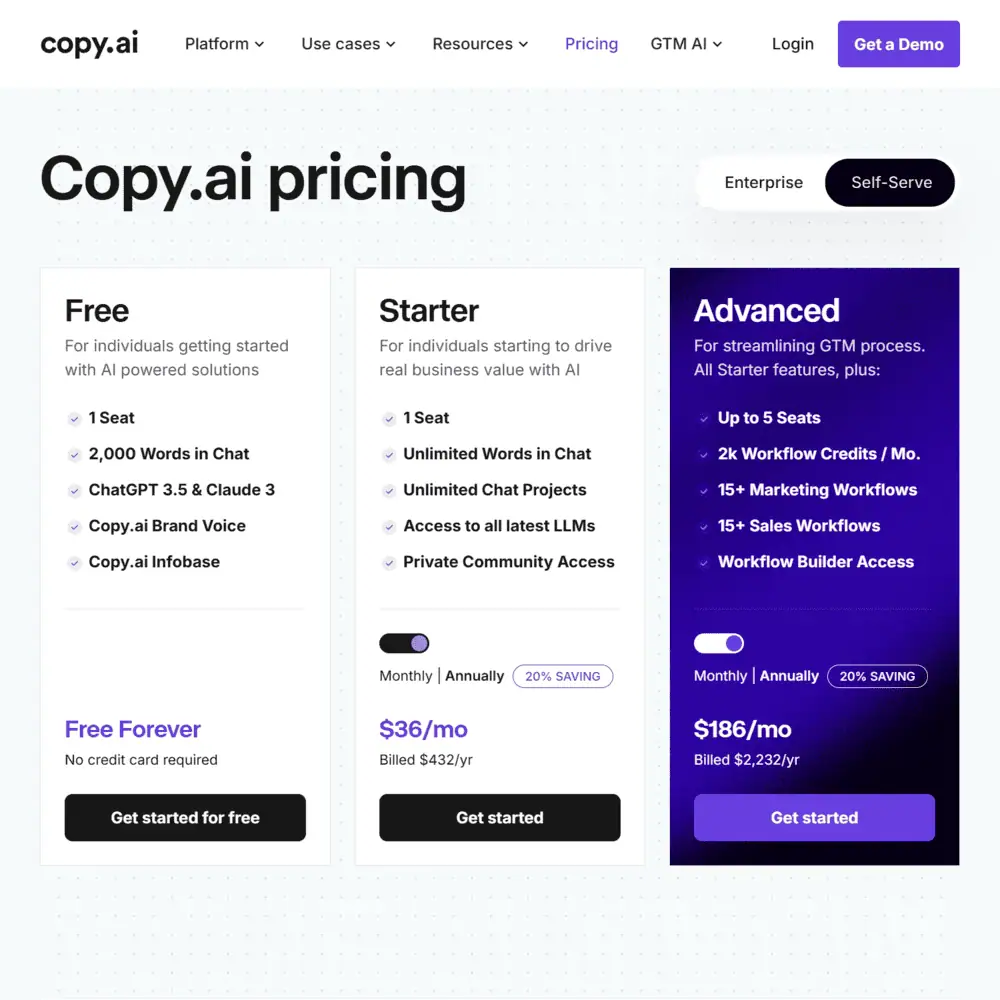
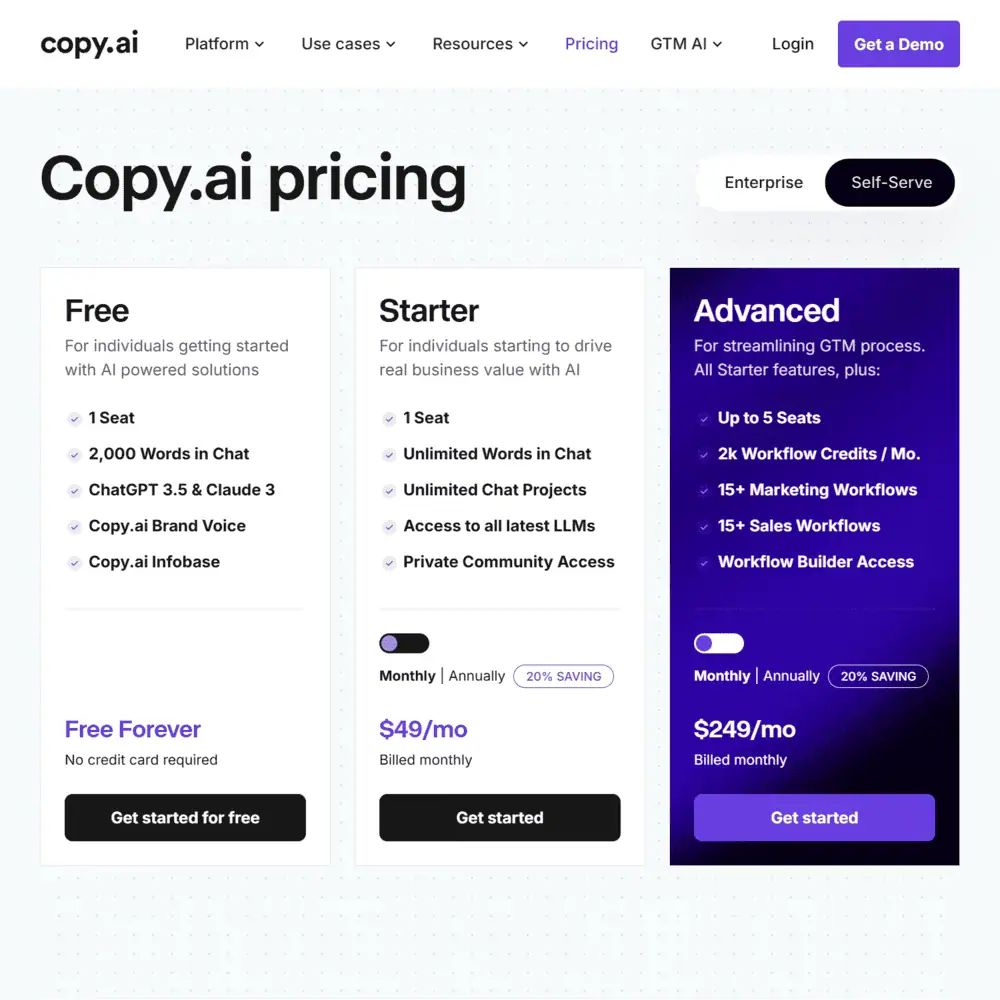
There are several pricing plans tailored to different users:
Free Plan
- Cost: $0 per month
- Features: The free ai writing generator plan allows up to 2,000 words per month, giving users a chance to explore the tool without any financial commitment.
Pro Plan
- Cost: $36 per month (or $432 annually)
- Features:
- Unlimited word generation
- Access to all tools and templates
- Priority customer support
- Collaboration features for team projects
Teams Plan
- Cost: Custom pricing based on the number of users
- Features:
- Includes all Pro plan features
- Additional user management options
- Advanced functionalities suited for larger operations and team collaboration
Pricing: Is Copy AI Worth The Money?
The value of Copy AI depends on your needs and content creation frequency. Here’s an analysis:
- Cost-Effectiveness: For individuals or small businesses, the $36 per month Pro plan is an economical choice. It provides a cheaper alternative to hiring a professional copywriter for generating high-quality content quickly.
- Features and Customization: There are numerous templates and customization options for brand voice, helping maintain a consistent tone across content. These features can improve the efficiency and quality of your content creation process.
- User Feedback: Reviews on platforms like G2 and Capterra indicate positive user experiences. Users appreciate the tool’s ease of use, the quality of generated content, and time savings. However, some users have mentioned occasional slow response times and the need for manual adjustments to ensure content quality.
- Potential Drawbacks: While Copy AI has many benefits, there are some limitations. The absence of a browser extension requires manual copying and pasting of content. Additionally, as AI content detection tools improve, there’s a possibility that AI-generated text might be flagged. To avoid this, it’s advisable to paraphrase and add unique insights.
How to Use Copy AI Effectively – Step-by-Step Guide
Using Copy AI effectively involves following a few straightforward steps. Here’s a step-by-step guide to get you started:
Step 1 – Visit the Copy AI Website and Create an Account
Click on the “Sign Up” button, located in the top right corner of the homepage. Register using your email address or Google account. After completing the registration form, you’ll receive a confirmation email. Click the link in the email to verify your account.
Step 2 – Choose a Plan
Once your account is verified, you can log in. You’ll be prompted to select a plan. There is a Free Plan that allows you to generate up to 2,000 words per month. If you need more features, consider the Pro Plan at $36 per month (or $432 per year), which provides unlimited word generation, access to all tools, priority support, and collaboration features. For larger teams, a custom Teams Plan with advanced user management options is available.
Step 3 – Navigating the Dashboard
After choosing your plan, you’ll be taken to the dashboard. The user-friendly dashboard has a left-hand menu that provides access to various tools and templates. Here, you can manage projects, view recent activities, and choose different content creation options like blog posts, social media posts, and product descriptions.
Step 4 – Start Writing Content
To create content, select the type of content you want from the dashboard options. Provide input such as a brief description of your product or service, keywords, and other relevant details. The more specific your input, the better the AI can tailor the content to your needs.
Step 5 – Generate and Review
After entering the necessary details, click the “Create” or “Generate” button. Several content variations will be produced based on your input. Review the generated content carefully for accuracy and relevance. Make any necessary edits to ensure the content meets your requirements.
Step 6 – Export or Save
Once your content is finalized, you can export it to your preferred format or save it within the platform for future use. To export, copy and paste the content into your document or download it directly if the option is available. Saving your work within the app makes it easy to access and manage your content through the dashboard.
Copy AI User Experience: How Good Is This AI in the Hands of a Content Writer?
We tested Copy AI to see how it performs. Here are our detailed observations based on our experience:
First Impressions and Usability
The site’s interface immediately impressed us with its simplicity and ease of navigation. The intuitive dashboard, with a well-organized menu, allowed us to quickly find tools and templates. We appreciated not having to spend time learning how to use the platform before starting content creation.
Quality of Generated Content
The quality of the content generated by this writing AI was quite good for straightforward topics. When creating product descriptions or blog introductions, the tool produced text that was engaging and coherent, requiring minimal editing. However, for more nuanced subjects, the AI occasionally missed the mark, requiring manual adjustments to meet our standards. We also noticed that this ai writing generator handles multilingual content well, supporting over 25 languages. This feature was particularly useful for our team, as we often need to create content in multiple languages.
Efficiency and Time-Saving
Copy AI significantly reduced the time spent on generating initial drafts. This was especially noticeable during brainstorming sessions. Instead of struggling with writer’s block, we could input basic ideas and receive several variations almost instantly. This feature accelerated our workflow and allowed us to focus more on refining and polishing the content.
Customization and Flexibility
Copy AI offers various templates and customization options, which proved valuable for different types of content. However, highly specialized industries sometimes required more tailored solutions. The tool’s ability to adjust the tone and incorporate specific keywords helped align the content with our brand voice, but there were instances where more customization would have been beneficial.
Collaboration Features
The collaboration features of Copy AI were a significant advantage for our team-based projects. We could share drafts, make comments, and edit content in real-time, streamlining our process. However, we did encounter occasional syncing issues, where changes made by one team member took time to appear for others. Though not a major drawback, it did cause minor disruptions in our workflow.
Drawbacks and Limitations
Despite its many strengths, this AI tool has some limitations. One notable issue is the absence of a browser extension, requiring manual copying and pasting of content between the tool and other applications. Additionally, as AI content detection tools improve, there’s a risk of AI-generated text being flagged, necessitating further paraphrasing and adding unique insights to pass these checks. Moreover, while Copy AI excels at generating base content, it struggles with creative tasks that require a higher degree of human ingenuity. Writing compelling storytelling pieces or highly technical articles often required significant human intervention to elevate the quality.
Copy AI Support: What if You Need Help When You Generate AI Content?
When using Copy AI to generate content, you might occasionally need assistance. Fortunately, there are several support options to help users resolve issues and optimize their experience. Here’s a detailed look at the available resources:
Contacting Customer Support
If you encounter problems or have specific questions, the most direct way to get help is by contacting the Copy AI customer service team through the Contact Us page. Fill out the contact form with your name, email, and a detailed description of your issue. The support team typically responds within a few business days, offering solutions or directing you to relevant resources.
Community Support
Copy AI has an active Community where users can ask questions, start discussions, and share ideas. This platform is particularly useful for getting advice from other users who may have faced similar challenges. Engaging with the community can provide quick answers and insights that might not be available through official support channels.
Getting Started Guides and Tutorials
For new users, Copy AI offers comprehensive Getting Started guides. These guides walk you through the initial setup, navigating the dashboard, and using different features effectively. Tutorials and step-by-step instructions are designed to help you maximize the tool’s potential from the outset.
FAQs and Help Articles
The FAQ section on the Copy AI website covers a wide range of common questions and issues. From troubleshooting steps to feature explanations, these articles provide detailed information that can help resolve many common problems without needing to contact support directly.
In-App Assistance
Copy AI includes in-app assistance features to help you while you work. Tooltips and prompts offer guidance on how to use various functions, and the interface is designed to be intuitive, reducing the likelihood of running into difficulties. If you need immediate help, these in-app features can be very handy.
Chat Feature
The Chat by Copy AI is another valuable support resource. This feature allows you to interact with an AI assistant for real-time support. It can answer questions about using Copy AI, suggest templates, and even help with generating content. This tool is particularly useful for quick queries and immediate assistance.
Copy AI vs Popular Alternatives
In a market filled with various AI content generators, Copy AI faces stiff competition from notable counterparts like Jasper and Ryter. Here’s an in-depth comparison to help you understand how this AI measures up against these alternatives.
Copy AI vs Jasper
- Features and Functionality: Jasper excels in long-form content creation with advanced algorithms and additional features such as SEO mode and a built-in plagiarism checker. It integrates with over 30 tools, including SurferSEO and HubSpot, making it suitable for enterprise marketers who need comprehensive analytics and seamless integration with other marketing tools. In contrast, Copy AI is more effective for short-form content such as social media posts, emails, and product descriptions, making it ideal for sales teams focusing on quick, targeted communications.
- Ease of Use: Both tools are user-friendly, but Copy AI has a more straightforward interface, which can be beneficial for beginners. Jasper, while slightly more complex, offers users a richer set of tools once they get accustomed to the platform.
- Pricing: Copy AI tends to be more affordable than Jasper, with Copy AI’s Pro plan starting at $35 per month, compared to Jasper’s Starter plan at $59 per month. This makes Copy AI a cost-effective choice for startups and small businesses. Jasper’s higher price point is justified by its extensive feature set, including advanced analytics that provide significant value for large enterprises.
- Customer Satisfaction: According to user reviews, both platforms score highly in customer satisfaction. Jasper holds a slight edge with 1,242 reviews scoring an average of 4.7/5 stars, compared to Copy AI’s 178 reviews also averaging 4.7/5 stars.
Copy AI vs Ryter
- Features and Functionality: Ryter, similar to Copy AI, focuses on generating short-form content but offers fewer customization options. Copy AI provides a variety of templates and allows adjustments to tone and style, giving users more control over the final output.
- Ease of Use: Both tools have intuitive interfaces. However, users often find Ryter more simplistic, which can be a double-edged sword: it’s easy to use but lacks the depth and flexibility offered by Copy AI.
- Pricing: Ryter is generally priced lower than Copy AI, with plans starting at $9 per month, making it attractive for individuals and small teams on a tight budget. However, Copy AI’s slightly higher price is balanced by its broader range of features and better support options.
- Customer Satisfaction: While specific user reviews vary, Ryter consistently receives praise for its ease of use and affordability. Copy AI garners positive feedback for its versatile functionality and efficiency in producing high-quality content quickly.
Is Copy AI Legit? Our Final Verdict
Our Copy ai review has highlighted the strengths in performance, innovation, and support of this AI writing tool while identifying areas for improvement in accuracy, feature richness, and pricing. In our opinion, this is a valuable tool that streamlines research, speeds up content creation, and helps generate ideas. While there is a small learning curve to understand its features, the effort is worthwhile. If you’re unsure how Copy AI can meet your needs, you can easily start with the free version, and explore the prompts and the Workflows library to see what the tool can do for you before you make a financial commitment.
Frequently Asked Questions (FAQs)
What AI models power Copy.ai?
Copy.ai runs on ChatGPT (GPT-3.5 & GPT-4) and Claude 3, combining these models with custom workflows, templates, and automation features for enhanced content creation.
How does Copy.ai improve content generation?
It provides brand voice customization, pre-built prompts, AI-powered research, and workflow automation, making it easier to create engaging, on-brand content quickly.
Can Copy.ai be used for SEO content?
Yes, it offers SEO-friendly blog outlines, keyword optimization, and meta description generation, helping writers craft content that ranks well in search engines.
Specification: Copy AI Review
| Basic Specifications | ||||||||||||||||||||||||
|---|---|---|---|---|---|---|---|---|---|---|---|---|---|---|---|---|---|---|---|---|---|---|---|---|
|
||||||||||||||||||||||||
| Pricing & Plans | ||||||||||||||||||||||||
|
||||||||||||||||||||||||
| Core Features | ||||||||||||||||||||||||
|
||||||||||||||||||||||||
| User Experience & Interface | ||||||||||||||||||||||||
|
||||||||||||||||||||||||
| AI Performance & Output Quality | ||||||||||||||||||||||||
|
||||||||||||||||||||||||
| Integrations & Compatibility | ||||||||||||||||||||||||
|
||||||||||||||||||||||||
| Automation & Workflows | ||||||||||||||||||||||||
|
||||||||||||||||||||||||
| Security & Compliance | ||||||||||||||||||||||||
|
||||||||||||||||||||||||
| Customer Support & Community | ||||||||||||||||||||||||
|
||||||||||||||||||||||||
Photos: Copy AI Review
User Reviews
Be the first to review “Copy AI Review”










There are no reviews yet.