Sudowrite Review
$10.00
If you’re a writer, you’ve probably stared at a blank page more times than you’d like to admit. The blinking cursor mocks you, ideas swirl in your head, but the words just won’t come. That’s where Sudowrite claims to step in—an AI-powered writing assistant built specifically for fiction writers. Unlike other AI tools that focus on emails, blogs, or marketing copy, Sudowrite is designed to help you craft novels, short stories, and screenplays.
But can AI really help with creative writing? Or does it end up generating generic, lifeless text that still needs heavy rewriting? In this Sudowrite review, we’ll break down how it works, its key features, pricing, usability, and how it compares to alternatives like NovelAI and Squibler.
What is Sudowrite? (And How It Works)
Sudowrite is an AI writing assistant tailored for fiction. Instead of just fixing grammar or summarizing text, it helps generate story ideas, expand scenes, rewrite paragraphs, and even simulate feedback from beta readers.
At its core, Sudowrite is powered by multiple AI models, including its proprietary Muse AI, built specifically for storytelling. The goal? To act like your personal co-writer—offering suggestions while keeping your style, characters, and plot intact.
Here’s a quick look at what Sudowrite AI actually does:
Sudowrite AI Key Features & Capabilities
1. AI Writing Assistant: Auto-Completes Your Story
Sudowrite’s main function is its Write feature, which auto-generates the next 300 words of your story based on your existing text. Unlike ChatGPT, it doesn’t just throw random sentences at you—it analyzes your tone, characters, and narrative style to produce something that (hopefully) fits.
It’s great for overcoming writer’s block, but sometimes the AI-generated text feels too safe—lacking real personality or bold storytelling choices. You’ll still need manual tweaks to make it feel truly yours.
2. Describe Tool: Fixing Bland Writing
Ever felt like your writing lacks depth? The Describe tool helps fix that by adding sensory details, emotional layers, and richer imagery to your scenes.
🔹 Example:
📌 Your sentence: She walked into the room.
📌 AI Suggestion: She stepped into the dimly lit room, the scent of old books and leather filling the air, as candlelight flickered across the oak shelves.
This is one of Sudowrite’s strongest tools—it genuinely improves scene-setting and immersive descriptions. However, you’ll still need to curate the suggestions so they don’t feel too “AI-generated.”
3. Rewrite Tool: Fixing Awkward Sentences
The Rewrite tool gives multiple versions of a sentence or paragraph, allowing you to choose the best one.
📌 Example: “She was nervous but excited.”
✏️ AI Rewrite Suggestions:
✔ “Excitement buzzed under her skin, though nerves threatened to surface.”
✔ “A thrill of nervous anticipation curled in her stomach.”
This is useful for reworking clunky prose—especially if you struggle with repetitive phrasing. But it doesn’t always nail nuance, so you might have to tweak the suggestions.
4. Story Bible: Structuring Your Novel
This feature helps outline and plan your story, generating character arcs, plot beats, and themes.
If you’re a pantser (someone who writes without outlining), this tool can help bring structure to your story without feeling restrictive.
5. AI Feedback: Your 24/7 Beta Reader
One of Sudowrite’s most unique features is AI-powered feedback. It analyzes your writing and provides:
✔ Strengths & weaknesses in your storytelling.
✔ Engagement level—does your scene flow well?
✔ Suggestions for improvement.
The feedback is decent but not groundbreaking. It’s great for catching basic issues, but not a substitute for human beta readers or editors.
Ease of Use & User Experience
One of the biggest selling points of Sudowrite AI is how easy it is to get started. Unlike some AI writing tools that require complex setups or integrations, the tool is completely web-based—meaning no downloads, no installations, and no messy configurations.
1. Sign-Up & Setup: Smooth and Simple
Getting started with Sudowrite is effortless. All you need to do is:
1️⃣ Go to the website
2️⃣ Sign up with an email (or Google account)
3️⃣ Start writing immediately—no credit card required
I appreciate that there’s no forced payment info upfront. You can actually test it before committing to a subscription.
2. Interface & Navigation: Functional, But Not Perfect
Once you’re inside, Sudowrite presents you with a clean but slightly busy interface. The different AI tools (Write, Describe, Rewrite, Feedback, etc.) are stacked on the side, making it easy to switch between them.
However, while it’s not overwhelming, it’s also not as distraction-free as a minimalist writing app like Scrivener or IA Writer.
✅ Pros:
✔ The interface is visually appealing and not outdated.
✔ All key tools are accessible from the side panel.
✔ Customization options (dark mode, font adjustments) are available.
❌ Cons:
- Too many pop-ups and suggestions—sometimes it feels like the AI is trying to take over.
- No true fullscreen mode—you can hide some elements, but it doesn’t feel as clean as a dedicated writing app.
- Switching between features (e.g., Write, Expand, Rewrite) requires a few clicks—could be smoother.
If you’re someone who prefers a streamlined, distraction-free workspace, you might find Sudowrite’s interface slightly cluttered. However, the learning curve is minimal, and once you adjust to the layout, navigating between tools becomes second nature.
3. Customization & Workflow
Sudowrite allows some basic customization to improve workflow. You can:
✔Switch between different themes (including dark mode).
✔ Organize projects into folders (helpful for novel writing).
✔ Enable/disable AI suggestions depending on your needs.
I like that Sudowrite gives you some control over how it interacts with your writing. However, I wish it had more workflow optimization features, like custom AI settings for different writing styles or a dedicated “focus mode.”
Comparison to Competitors
Sudowrite AI is in a unique spot among AI writing tools. While many AI assistants cater to marketers, bloggers, or students, Sudowrite is built specifically for creative writers—especially novelists. But how does it compare to similar tools in the space?
Sudowrite vs. NovelAI
Both Sudowrite and NovelAI focus on fiction writing, but they take very different approaches:
Feature |
Sudowrite |
NovelAI |
|---|---|---|
| Best For | Novelists, fiction writers, screenwriters | Role-playing, AI-driven storytelling, interactive fiction |
| AI Customization | Learns your style but not deeply customizable | Deep customization with AI “personality” tuning |
| Editing & Rewriting | Strong rewrite & expansion tools | Focused more on AI-generated text |
| User Interface | Modern & clean | A bit more complex and game-like |
| Pricing | Starts at $10/month | Starts at $10/month |
- If you want more control over AI-driven storytelling, NovelAI might be the better choice.
- If you want an assistant to help you brainstorm, rewrite, and edit your novel, Sudowrite is the clear winner.
Sudowrite vs. Jasper AI
Jasper AI is one of the most well-known AI writing tools, but it’s mainly built for marketing, not creative writing.
Feature |
Sudowrite |
Jasper AI |
|---|---|---|
| Best For | Fiction writers, novelists | Copywriters, marketers, business writing |
| Storytelling Features | Very strong (character development, pacing, dialogue) | Weak (not designed for storytelling) |
| SEO Tools | None | Built-in SEO optimization |
| Pricing | More affordable ($10/month+) | More expensive ($39+/month) |
- If you want a tool that helps with storytelling, Sudowrite wins easily.
- If you’re looking for AI-driven blog posts, marketing copy, or SEO content, Jasper is the better choice.
Alternative AI Writing Tools
Looking for other options? Here are some alternatives to Sudowrite:
✔ Squibler – Another AI-powered fiction tool, though less advanced than Sudowrite.
✔ NovelCrafter – A newer AI tool designed specifically for fiction writers.
✔ Writesonic – A broader AI writing tool with some fiction capabilities, but not as refined as Sudowrite.
Overall, Sudowrite stands out as the best AI for creative writers, but if you’re looking for SEO, business writing, or highly interactive AI stories, there are other tools to consider.
Sudowrite Pricing & Subscription Plans
Is Sudowrite Free?
Sudowrite offers a free trial, but after that, you’ll need a paid plan to continue using the AI features.
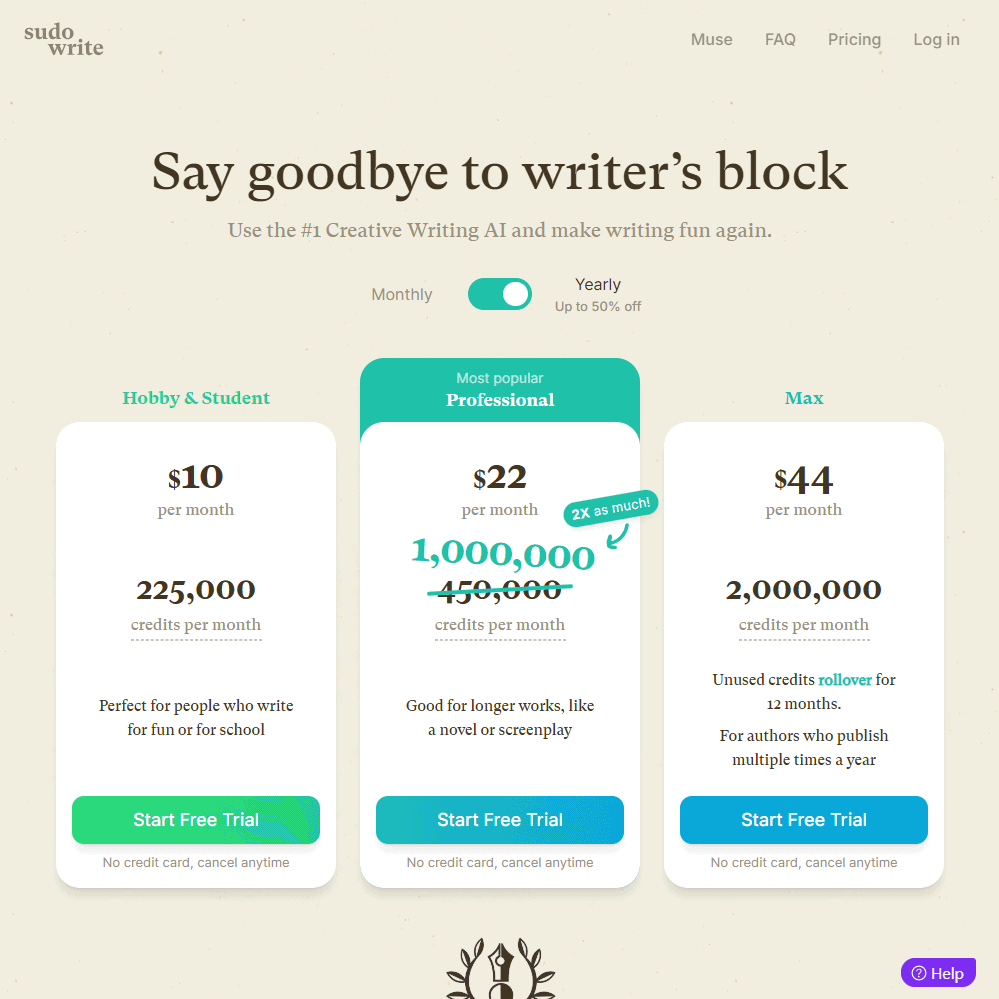
Sudowrite Pricing Breakdown
Plan |
Monthly Price |
Annual Price (Discounted) |
Credits |
|---|---|---|---|
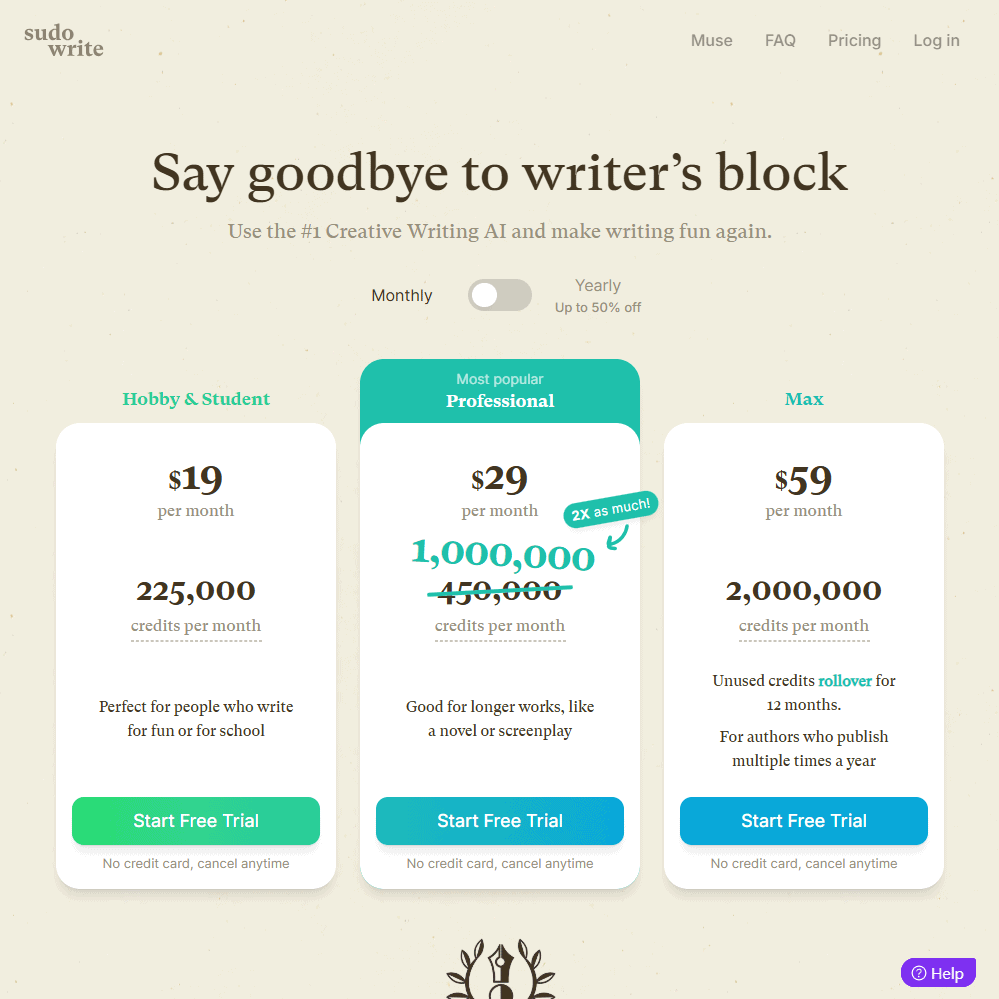
| Hobby & Student | $19/month | $10/month | 225,000 credits |
| Professional | $29/month | $22/month | 1,000,000 credits |
| Max | $59/month | $44/month | 2,000,000 credits |
💡 Enterprise pricing is also available for high-volume writers or publishing teams.
Discounts & Refund Policy
✔ 50% off if you choose the annual plan.
✔ No student discounts are currently available.
✔ Refund policy unclear – Sudowrite does not explicitly state a money-back guarantee, so be cautious.
Compared to tools like Jasper AI or NovelAI, Sudowrite is priced very reasonably, especially for fiction writers. However, the credit-based system can feel a bit restrictive, so if you write a lot, you may need to upgrade to higher-tier plans.
Sudowrite Review Final Verdict & Recommendations
So, is Sudowrite Worth It?
If you’re a fiction writer, novelist, or screenwriter, Sudowrite is absolutely worth considering. It’s one of the few AI writing tools designed specifically for storytelling, and its features help with writer’s block, scene descriptions, and character development.
However, if you’re looking for a tool for SEO writing, blog posts, or non-fiction content, Sudowrite isn’t the best choice—you’d be better off with Jasper or Writesonic.
Who is Sudowrite Best For?
✅ Novelists & Fiction Writers – The AI understands storytelling better than most writing tools.
✅ Screenwriters & Scriptwriters – Great for generating dialogue and scene descriptions.
✅ Creative Writers Struggling with Writer’s Block – The AI helps push past creative roadblocks.
Who Should Look Elsewhere?
❌ Bloggers & Content Marketers – Sudowrite lacks SEO tools and isn’t designed for structured blog writing.
❌ Users Needing Deep AI Customization – If you want detailed AI fine-tuning, something like NovelAI is better.
❌ Writers Who Want Unlimited AI Generation – The credit system can feel limiting if you write at a high volume.
Frequently Asked Questions (FAQs)
Is Sudowrite free to use?
Sudowrite offers a free trial, but after that, you need a paid subscription. Plans start at $10/month if you pay annually.
How does Sudowrite compare to NovelAI?
Sudowrite is better for structured novel writing, while NovelAI is more focused on AI-generated storytelling and roleplay.
Does Sudowrite offer a refund?
Sudowrite’s refund policy isn’t explicitly stated, so it’s best to test the free trial before committing.
Specification: Sudowrite Review
| Basic Specifications | ||||||||||||||||||
|---|---|---|---|---|---|---|---|---|---|---|---|---|---|---|---|---|---|---|
|
||||||||||||||||||
| Pricing & Plans | ||||||||||||||||||
|
||||||||||||||||||
| Core Features | ||||||||||||||||||
|
||||||||||||||||||
| User Experience & Interface | ||||||||||||||||||
|
||||||||||||||||||
| Integrations & Compatibility | ||||||||||||||||||
|
||||||||||||||||||
| Automation & Workflows | ||||||||||||||||||
|
||||||||||||||||||
| Security & Compliance | ||||||||||||||||||
|
||||||||||||||||||
| Customer Support & Community | ||||||||||||||||||
|
||||||||||||||||||
Photos: Sudowrite Review
User Reviews
Be the first to review “Sudowrite Review”











There are no reviews yet.