Wordtune AI Review
$13.99
If you’ve ever struggled with rewording sentences to make them clearer, more engaging, or more professional, you might have heard of Wordtune. This AI-powered writing tool is designed to help users rewrite, paraphrase, and summarize text with ease. But does it actually deliver? In this Wordtune review, I’ll go through the tool’s key features, ease of use, pricing, and how it compares to alternatives. Whether you’re looking for a Wordtune free plan or wondering if it’s the right tool for your writing needs, this review has you covered.
Wordtune AI Key Features & Capabilities
AI Writing & Rewriting
One of the standout features of Wordtune AI is its ability to rewrite sentences in multiple ways while maintaining the original meaning. This is useful for anyone who wants to refine their writing style, from students and bloggers to professionals.
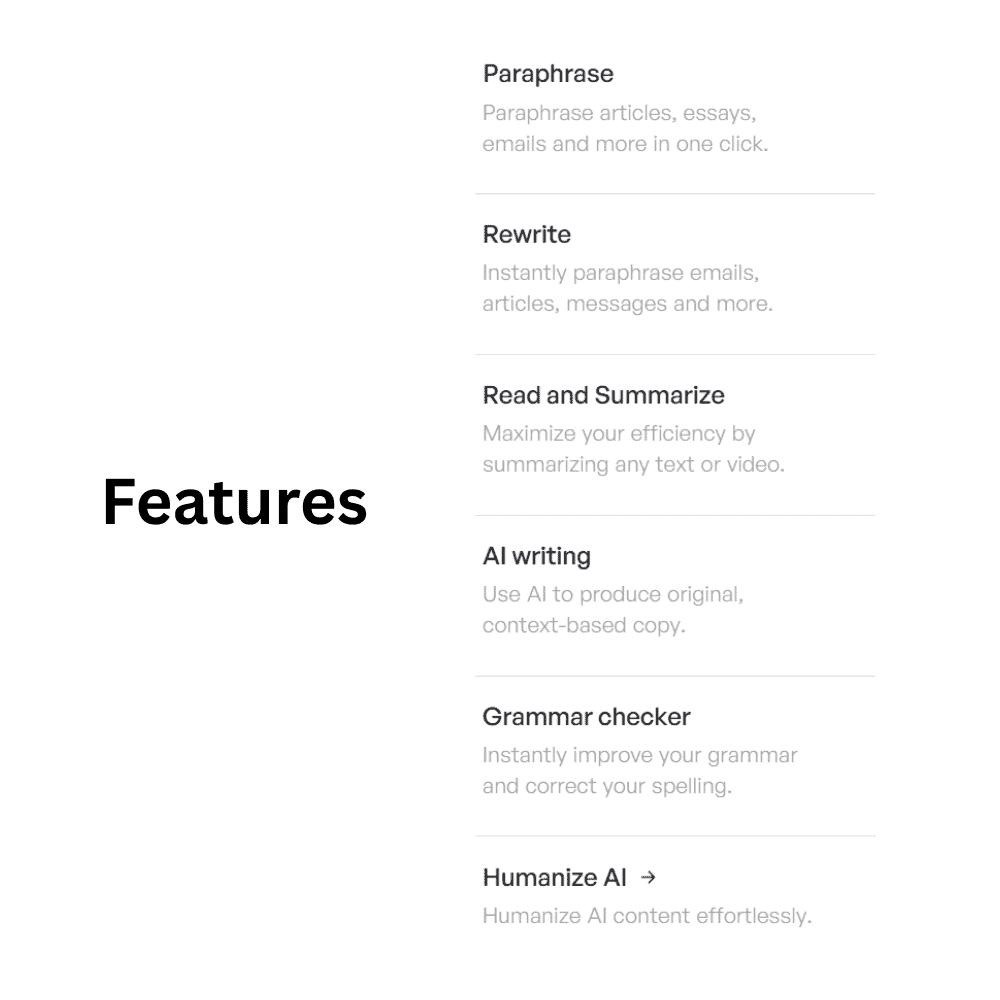
- Sentence Rewriting – The Wordtune Rewrite function offers alternative ways to phrase a sentence.
- Paraphrasing – Using Wordtune Paraphrase, you can restructure text to improve clarity without changing its intent.
- Summarization – The Wordtune Summarizer is useful for condensing long-form content into key points.
I found the sentence rewriter handy when I needed to simplify long-winded sentences. However, it doesn’t always provide context-aware suggestions, which can be a drawback when rewriting complex ideas.
Grammar & Style Suggestions
Wordtune also provides basic grammar and spelling corrections, but it’s not as advanced as Grammarly. It suggests ways to improve sentence flow and readability, but if you need deep grammar insights, this might not be the best tool. While I liked the clarity suggestions, I noticed Wordtune AI doesn’t catch as many grammatical errors as Grammarly. It’s better suited for rewriting and improving readability rather than being a full-fledged grammar checker.
Browser Extensions & Integrations
For those who prefer writing directly in their browser, the Wordtune Extension is available for Chrome, Edge, and Firefox. This allows you to use its rewriting and paraphrasing tools on platforms like Google Docs, Gmail, and social media. The Wordtune Editor integration with Google Docs is a big plus. I liked being able to edit my writing in real time without switching tabs. However, I wish it had more integrations with apps like Notion or Microsoft Word.
Ease of Use & User Experience
Sign-In & Setup
Getting started is easy. You can create an account via Wordtune Login or use Wordtune Sign In with Google.
User Interface & Workflow
- The Wordtune Workspace is minimalistic and straightforward.
- Rewriting sentences is just a click away, and the tool highlights alternative phrasings in a dropdown format.
- There aren’t too many distractions, making it easy to focus on your writing.
I liked how simple and clean the UI is, but I wish there was an undo button for quick reversals of AI suggestions.
Wordtune vs Grammarly – Which One Is Better?
If you’re deciding between Wordtune or Grammarly, it really comes down to what you need.
| Feature | Wordtune | Grammarly |
|---|---|---|
| AI-Powered Rewriting | ✅ Yes | ❌ No |
| Grammar & Spell Check | ✅ Yes | ✅ Yes |
| Summarization | ✅ Yes | ❌ No |
| Tone Adjustment | ✅ Yes | ✅ Yes |
| Plagiarism Checker | ❌ No | ✅ Yes |
| AI Writing Generator | ❌ No | ✅ Yes |
Personal Take:
- Wordtune AI is better if you need rewriting, summarization, and sentence restructuring.
- Grammarly is better for deep grammar corrections and plagiarism detection.
- Neither tool offers full AI writing capabilities like Jasper or Copy.ai.
Similar to Wordtune – Alternative Tools to Consider
If you’re looking for apps like Wordtune, here are some solid alternatives:
✅ QuillBot – More advanced paraphrasing but lacks a deep grammar checker.
✅ Hemingway Editor – Great for readability but doesn’t offer AI rewriting.
✅ ProWritingAid – A mix of grammar correction and style enhancement, similar to Grammarly.
Wordtune Pricing & Subscription Plans
Is Wordtune Free? What Do You Get Without Paying?
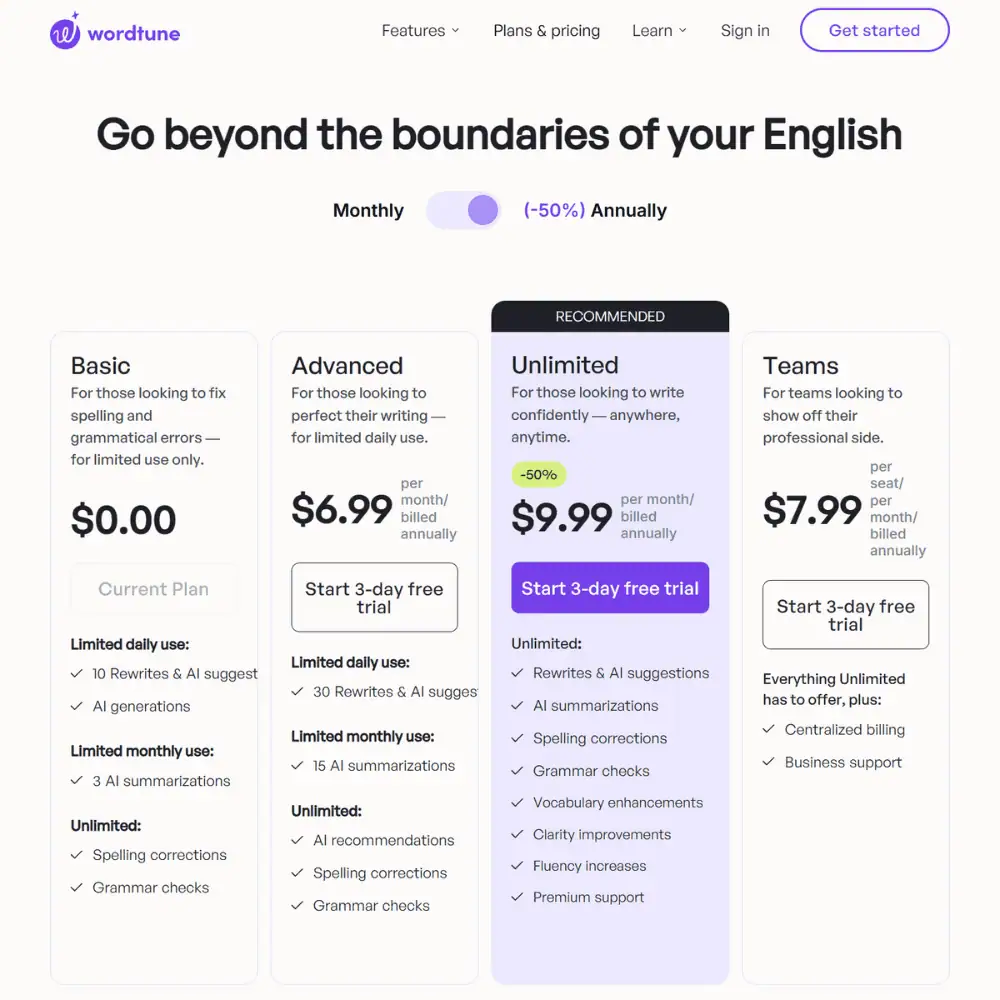
Yes! There is a Wordtune Free plan, but it comes with significant limitations. Here’s what you get:
✅ 10 rewrites per day (after that, you’re locked out).
✅ Basic grammar and spelling corrections (like fixing typos).
✅ Basic rewrite suggestions for clarity and fluency.
❌ No tone customization (Formal, Casual, Shorten, or Expand).
❌ No full-paragraph rewriting.
❌ No summarization feature.
For casual users who only need occasional sentence improvements, this is fine. But if you do a lot of writing, 10 rewrites disappear fast.
Wordtune Pricing – Is It Worth Paying For?
Wordtune has three paid plans, each unlocking more AI features:
💰 Advanced Plan – $13.99/month ($6.99/month billed annually)
✔️ 30 rewrites per day (big jump from free but still limited).
✔️ 15 AI summarizations per month
✔️ Grammar and spelling suggestions
💰 Unlimited Plan – $19.99/month ($9.99/month billed annually)
✔️ Unlimited rewrites
✔️ Unlimited AI summarizations
✔️ Vocabulary enhancements
✔️ Tone & style customization (Casual, Formal, Shorten, Expand)
💰 Business Plan – $15.99 per user/month ($7.99/user billed annually)
✔️ Everything from Unlimited, plus:
✔️ Team collaboration & centralized billing
✔️ Business support
Wordtune Discount Code & Student Discount
✅ Students get 30% off any paid plan with the Wordtune Student Discount.
✅ Occasionally, a Wordtune Discount Code is available for new users.
I like that Wordtune has a middle-tier option (Advanced) for those who don’t need unlimited use. However, the free plan is extremely restrictive, and the gap between Advanced and Unlimited is frustrating—30 rewrites per day still feels limited if you write regularly. If you only need rewriting and summarization, Wordtune’s pricing is fair, but if you need deep grammar checks, plagiarism detection, or AI-generated content, tools like Grammarly Premium or Jasper AI may offer more value.
Final Verdict – Is Wordtune Worth It?
After spending time using Wordtune AI, here’s what I honestly think:
Who Is Wordtune Best For?
✅ Students – If you struggle with sentence structure and clarity, it’s a great AI-powered rewriter.
✅ Professionals – Good for emails and reports when you need quick readability fixes.
✅ Bloggers & Content Creators – Helps reword awkward sentences, but don’t expect full AI writing.
✅ Non-Native English Speakers – The tone adjustment feature is very useful for sounding natural.
Who Should Look Elsewhere?
❌ Anyone who needs plagiarism detection.
❌ Writers looking for AI-generated long-form content.
❌ Users who want deep, Grammarly-level grammar analysis.
What I Liked:
✔️ AI rewriting is genuinely useful – It’s great at restructuring sentences without changing the meaning.
✔️ Tone adjustments work well – Switching between Casual and Formal is seamless.
✔️ The Chrome extension is convenient – Works inside Google Docs, email, and even social media.
What Could Be Improved:
❌ No plagiarism checker – Even a basic checker would be useful.
❌ Rewrites feel generic sometimes – It could offer more context-based suggestions.
❌ Free plan is too limited – 10 rewrites per day runs out fast.
💡 Bottom Line: If you need a powerful AI-powered sentence rewriter, Wordtune is one of the best tools available. However, if you want full AI writing, SEO optimization, or grammar-focused corrections, you might need an alternative.
Frequently Asked Questions (FAQs)
Is Wordtune better than Grammarly?
It depends. Wordtune vs Grammarly is a question of use case:
- Grammarly is better for grammar checking, punctuation fixes, and plagiarism detection.
- Wordtune AI is better for sentence rewriting, summarization, and tone adjustments.
Does Wordtune offer a free version?
Yes, there’s a Wordtune Free plan, but it’s very limited—you only get 10 rewrites per day and no tone customization.
What are the best alternatives to Wordtune?
If you’re looking for Wordtune Alternatives, here are three solid options:
- QuillBot – A more advanced paraphraser with academic writing tools.
- Hemingway Editor – Improves readability, but lacks AI rewriting.
- ProWritingAid – A Grammarly-style alternative with deep writing analysis.
Specification: Wordtune AI Review
| Basic Specifications | ||||||||||||||||||||
|---|---|---|---|---|---|---|---|---|---|---|---|---|---|---|---|---|---|---|---|---|
|
||||||||||||||||||||
| Pricing & Plans | ||||||||||||||||||||
|
||||||||||||||||||||
| Core Features | ||||||||||||||||||||
|
||||||||||||||||||||
| User Experience & Interface | ||||||||||||||||||||
|
||||||||||||||||||||
| AI Performance & Output Quality | ||||||||||||||||||||
|
||||||||||||||||||||
| Integrations & Compatibility | ||||||||||||||||||||
|
||||||||||||||||||||
| Automation & Workflows | ||||||||||||||||||||
|
||||||||||||||||||||
| Security & Compliance | ||||||||||||||||||||
|
||||||||||||||||||||
| Customer Support & Community | ||||||||||||||||||||
|
||||||||||||||||||||
| Filter Set for AI Writing | ||||||||||||||||||||
|
||||||||||||||||||||
Photos: Wordtune AI Review

User Reviews
Be the first to review “Wordtune AI Review”












There are no reviews yet.